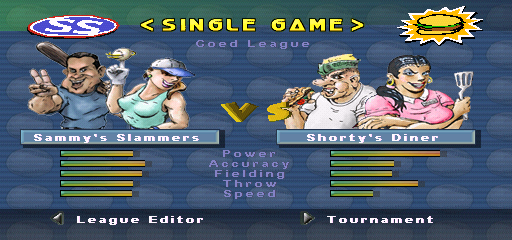
The game loads when you press Play · press “Play Now” inside the game if it asks.
Sammy Sosa Softball Slam
Sammy Sosa Softball Slam
Sammy Sosa Softball Slam: PSX Sports
- PlayStation PSX
- Sports
- 5· 0 votes
Sammy Sosa Softball Slam is a sports video game released for the PlayStation PSX. It was developed during the late 1990s and is based on the popular sport of softball, featuring the famed baseball player Sammy Sosa. This title fits within the sports genre, which was quite popular on the PSX, especially during its early years when sports games were evolving in terms of graphics and gameplay mechanics.
In the game, players engage in fast-paced softball matches, taking control of various teams and players. The gameplay focuses on the mechanics of batting, pitching, and fielding, typical of sports titles from this era. Players can expect a blend of arcade-style action with simplified controls, allowing for quick, enjoyable matches that are accessible even to those unfamiliar with the sport.
What makes Sammy Sosa Softball Slam worth a try today is its nostalgic value and the charm of retro sports games. While it may not have the depth of more modern titles, it offers a fun, light-hearted experience that resonates with fans of the genre. It serves as a reminder of the era when sports games were often straightforward, emphasizing fun over realism, making it a nice addition to any retro gaming library.
GAME INFO
- Platform
- PlayStation PSX
- Genre
- Sports
How to play Sammy Sosa Softball Slam online
Getting Started: To dive into Sammy Sosa Softball Slam, start by selecting your team from the available options. Once the game begins, you'll find yourself in a softball match where you will alternate between batting and fielding. The core loop consists of pitching the ball, hitting it, and then running to score points.
As you play, pay attention to the different mechanics like power-ups and special abilities that can enhance your gameplay. Mastering the timing for hitting and the strategy of fielding will significantly improve your chances of winning. The game is designed to be approachable, so even newcomers to sports games should find it easy to pick up and enjoy the matches.
CONTROLS
Controls
- Arrow Keys — D-Pad / Movement
- X — Cross ( × )
- S — Square ( □ )
- Z — Triangle ( △ )
- A — Circle ( ○ )
- Q — L1 shoulder
- E — R1 shoulder
- Enter — Start
- V — Select
Sammy Sosa Softball Slam FAQ
Who developed Sammy Sosa Softball Slam?
The developer of Sammy Sosa Softball Slam is not widely documented.
Is Sammy Sosa Softball Slam an official release, a fan hack, a prototype, or another kind of build?
This title is an official release for the PlayStation PSX, focusing on the sport of softball.
What makes Sammy Sosa Softball Slam stand out among PlayStation PSX titles of its era?
It offers a straightforward and fun approach to softball, appealing to fans of retro sports games while providing a nostalgic experience for players.
You may also like
All PlayStation PSX games











GAME INFO
- Platform
- PlayStation PSX
- Genre
- Sports
COMMENTS (0)
No comments yet. Be the first to share your thoughts.