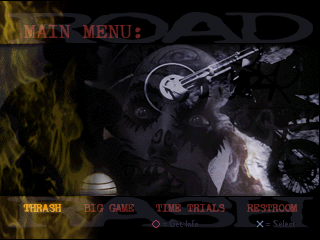
The game loads when you press Play · press “Play Now” inside the game if it asks.
Road Rash 3D
Road Rash 3D
What is Road Rash 3D?
- PlayStation PSX
- Racing
- 5· 0 votes
Road Rash 3D is a racing game that was released for the PlayStation in 1998. Developed by Darkseed and published by Electronic Arts, this title is part of the larger Road Rash franchise that began in the early 90s. It incorporates a mix of racing and combat elements, allowing players to engage in motorcycle racing while also fighting against opponents on the road.
In Road Rash 3D, players take control of a motorcycle racer who must compete in various races while navigating through traffic and engaging in combat with other racers. The game features a range of bikes and allows players to earn upgrades and new rides as they progress. Players can attack opponents using various weapons, adding an extra layer of strategy to the racing experience, which is a hallmark of the Road Rash series.
This title is worth trying for those who appreciate classic racing games with a twist. While it may not have the same level of polish as contemporary titles, its unique blend of racing and combat offers a nostalgic experience for fans of the genre. Compared to other racing games of its time, Road Rash 3D stands out for its gritty aesthetic and engaging gameplay, making it a memorable entry in the PlayStation library.
GAME INFO
- Platform
- PlayStation PSX
- Genre
- Racing
- Publisher
- Electronic Arts
- Developer
- Electronic Arts
- Released
- 1998
- Players
- 1-2
- Region
- USA
How to play Road Rash 3D online
Getting started in Road Rash 3D involves choosing a bike and entering a race. Players will navigate through tracks filled with other racers and obstacles, using their skills to maintain speed and avoid crashes. The core loop revolves around racing, earning points, and unlocking new bikes and upgrades.
As you race, keep an eye on your opponents and don’t hesitate to use weapons to gain an advantage. Mastering the controls and understanding the mechanics of attacking while racing is essential for success. New players should focus on familiarizing themselves with the tracks and the various bike types available, as each has its strengths and weaknesses.
CONTROLS
Controls
- Arrow Keys — D-Pad / Movement
- X — Cross ( × )
- S — Square ( □ )
- Z — Triangle ( △ )
- A — Circle ( ○ )
- Q — L1 shoulder
- E — R1 shoulder
- Enter — Start
- V — Select
Road Rash 3D FAQ
Roughly how long does it take to finish Road Rash 3D?
Finishing Road Rash 3D can vary greatly depending on player skill and the chosen difficulty. On average, players might take around 10-15 hours to complete the main content of the game.
Is Road Rash 3D exclusive to PlayStation PSX or did it appear on other systems?
Road Rash 3D was primarily released for the PlayStation, but it did not appear on other systems. The game was designed specifically for the PSX platform, which was common for many titles during that era.
What type of game is Road Rash 3D?
This title is classified as a racing game that incorporates elements of combat. Players race motorcycles while also engaging in brawls with other racers, which is a signature feature of the Road Rash series.
You may also like
All PlayStation PSX games











GAME INFO
- Platform
- PlayStation PSX
- Genre
- Racing
- Publisher
- Electronic Arts
- Developer
- Electronic Arts
- Released
- 1998
- Players
- 1-2
- Region
- USA
COMMENTS (0)
No comments yet. Be the first to share your thoughts.