The game loads when you press Play · press “Play Now” inside the game if it asks.
Punky Skunk
Punky Skunk
What is Punky Skunk?
- PlayStation PSX
- Platformer
- 5· 0 votes
Punky Skunk is a platformer game released for the PlayStation PSX, known for its colorful graphics and engaging gameplay. The title was developed during the late 1990s, a period marked by a surge in 3D platforming titles. While not as widely recognized as some contemporaries, it has garnered a niche following among retro gaming enthusiasts who appreciate its unique charm.
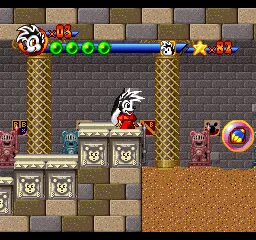
In Punky Skunk, players navigate through various levels filled with obstacles, enemies, and collectibles. The gameplay revolves around jumping, running, and utilizing power-ups to progress through the environments. Each level presents its own challenges, encouraging players to adapt their strategies as they face different enemy types and platforming puzzles.
This title is worth trying for those who enjoy the platforming genre, especially from the PSX era. While it may not have the same level of polish or fame as franchises like Crash Bandicoot or Spyro the Dragon, Punky Skunk provides a fun experience for fans of classic 3D platformers. Its whimsical art style and straightforward mechanics make it an interesting addition to any retro gaming collection.
GAME INFO
- Platform
- PlayStation PSX
- Genre
- Platformer
- Developer
- Ukiyotei
- Released
- 1996
How to play Punky Skunk online
Getting Started: To begin playing Punky Skunk, start by selecting your game mode from the main menu. The game features a series of levels where you will control Punky, navigating through different environments filled with challenges and enemies. The menu is primarily in Japanese, so players should familiarize themselves with basic navigation to get started.
Once you begin, focus on mastering the controls to jump and run through the levels. Collect items and power-ups that will help you overcome obstacles and defeat enemies. The core gameplay loop involves progressing through each level, defeating foes, and reaching the end to unlock subsequent stages. Pay attention to the unique features of each level, as they may require different approaches to clear successfully.
CONTROLS
Controls
- Arrow Keys — D-Pad / Movement
- X — Cross ( × )
- S — Square ( □ )
- Z — Triangle ( △ )
- A — Circle ( ○ )
- Q — L1 shoulder
- E — R1 shoulder
- Enter — Start
- V — Select
Punky Skunk FAQ
What type of game is Punky Skunk?
A platformer that combines action and puzzle-solving elements, allowing players to navigate through various levels.
Is Punky Skunk exclusive to PlayStation PSX or did it appear on other systems?
The game was primarily released for the PlayStation PSX and is not known to have appeared on other systems.
Is Punky Skunk an official release, a fan hack, a prototype, or another kind of build?
Punky Skunk is an official release for the PlayStation PSX, developed during the platform's heyday in the late 1990s.
You may also like
All PlayStation PSX games











GAME INFO
- Platform
- PlayStation PSX
- Genre
- Platformer
- Developer
- Ukiyotei
- Released
- 1996
COMMENTS (0)
No comments yet. Be the first to share your thoughts.