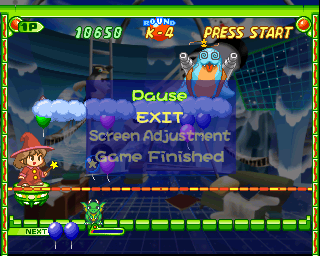
The game loads when you press Play · press “Play Now” inside the game if it asks.
Pop n' Pop
Pop n' Pop
Pop n' Pop on PSX
- PlayStation PSX
- Puzzle
- 5· 0 votes
Pop n' Pop is a puzzle game that was released for the PlayStation PSX in Japan. Developed by the team behind the popular Puzzle series, this title offers a blend of classic puzzle gameplay with colorful graphics and engaging mechanics. As a part of the puzzle genre, it fits well into the era of gaming where such titles were gaining immense popularity, particularly in Japan.
In Pop n' Pop, players are tasked with matching and clearing colored blocks by launching them onto the playfield. The game employs a straightforward mechanic where you aim and shoot these blocks, attempting to create groups of three or more of the same color to eliminate them. As you progress, the challenges become more complex, requiring strategic thinking and quick reflexes to manage the ever-increasing pace of the game.
What makes Pop n' Pop worth trying today is its accessibility and charm. While it may not have the same level of fame as other puzzle titles from its era, it provides a solid experience for those who enjoy competitive puzzle-solving. It can be seen as a hidden gem among retro games, appealing to both casual players and hardcore fans of the genre, particularly for those looking to explore lesser-known titles on the PlayStation platform.
GAME INFO
- Platform
- PlayStation PSX
- Genre
- Puzzle
- Players
- 1
- Region
- Japan
How to play Pop n' Pop online
To get started in Pop n' Pop, first choose your game mode from the main menu. The game begins with a simple introduction to the mechanics, where you will learn to aim and shoot blocks onto the playfield. The core loop revolves around creating matches of three or more blocks of the same color to clear them from the screen, and as you progress, you will encounter different challenges and levels.
As you play, pay attention to the speed of the blocks falling and the patterns you can create. Timing is essential, as you want to clear blocks efficiently to prevent them from reaching the top of the screen. Familiarize yourself with the controls and practice your aiming to maximize your score. If you're playing a version with Japanese menus, don't hesitate to experiment with options and settings to get comfortable with the interface.
CONTROLS
Controls
- Arrow Keys — D-Pad / Movement
- X — Cross ( × )
- S — Square ( □ )
- Z — Triangle ( △ )
- A — Circle ( ○ )
- Q — L1 shoulder
- E — R1 shoulder
- Enter — Start
- V — Select
Pop n' Pop FAQ
Who developed Pop n' Pop?
The developer of Pop n' Pop is not widely documented, but it is known to be created by a team associated with puzzle games during that era.
Is Pop n' Pop exclusive to PlayStation PSX or did it appear on other systems?
This game is primarily known for its release on the PlayStation PSX, and there is no widely documented evidence of it being available on other systems.
Does Pop n' Pop have a multiplayer or co-op mode?
Pop n' Pop does not have a multiplayer or co-op mode, focusing instead on single-player puzzle gameplay that challenges individual skill and strategy.
You may also like
All PlayStation PSX games











GAME INFO
- Platform
- PlayStation PSX
- Genre
- Puzzle
- Players
- 1
- Region
- Japan
COMMENTS (0)
No comments yet. Be the first to share your thoughts.