The game loads when you press Play · press “Play Now” inside the game if it asks.
Pinobee
Pinobee
Pinobee - Platformer Classic
- PlayStation PSX
- Platformer
- 5· 0 votes
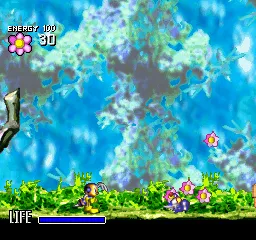
Pinobee is a platformer game developed for the PlayStation, also known as PSX. It was released in Japan and is notable for its colorful graphics and engaging gameplay. As a title from the late 90s, it reflects the era's trends in platform gaming, offering a whimsical experience that emphasizes exploration and character-driven narratives.
In Pinobee, players control a small character navigating through various levels filled with obstacles and enemies. The gameplay involves jumping, running, and utilizing unique abilities to progress through each stage. Players will encounter a variety of challenges, including platforming sections and enemy encounters, which require quick reflexes and strategic thinking to overcome.
This title is worth exploring today for anyone interested in classic platformers, especially those from the PSX era. While it may not be as widely recognized as contemporaries like Crash Bandicoot or Spyro, Pinobee offers a nostalgic experience that showcases the charm of early 3D platforming. Its simplicity and engaging level design make it a fun addition to any retro gaming library, especially for those looking to experience lesser-known titles from the platform's vast catalog.
GAME INFO
- Platform
- PlayStation PSX
- Genre
- Platformer
- Players
- 1
- Region
- Japan
How to play Pinobee online
Getting started in Pinobee involves selecting your character and navigating through the initial levels. As you begin, familiarize yourself with the controls and the layout of the stages. The core gameplay loop revolves around jumping between platforms, defeating enemies, and collecting items or power-ups that enhance your abilities.
As you progress, pay attention to the level design and the various obstacles you encounter. Timing your jumps and understanding enemy patterns will be crucial for advancing through the game. While the game is primarily in Japanese, the intuitive nature of platformers means that players can often navigate without needing to understand every menu option. Enjoy the exploration and challenge each level presents.
CONTROLS
Controls
- Arrow Keys — D-Pad / Movement
- X — Cross ( × )
- S — Square ( □ )
- Z — Triangle ( △ )
- A — Circle ( ○ )
- Q — L1 shoulder
- E — R1 shoulder
- Enter — Start
- V — Select
Pinobee FAQ
Who developed Pinobee?
The developer of Pinobee is not widely documented, making specific information about the team or studio behind it elusive.
Is there anything iconic or memorable about Pinobee?
Pinobee is remembered for its vibrant graphics and engaging platforming mechanics, though it does not hold a prominent place in gaming history compared to other PSX titles.
Roughly how long does it take to finish Pinobee?
Completing Pinobee typically takes a few hours, depending on the player's skill level and familiarity with platforming games.
You may also like
All PlayStation PSX games











GAME INFO
- Platform
- PlayStation PSX
- Genre
- Platformer
- Players
- 1
- Region
- Japan
COMMENTS (0)
No comments yet. Be the first to share your thoughts.