The game loads when you press Play · press “Play Now” inside the game if it asks.
Killer Loop
Killer Loop
What is Killer Loop?
- PlayStation PSX
- Racing
- 5· 0 votes
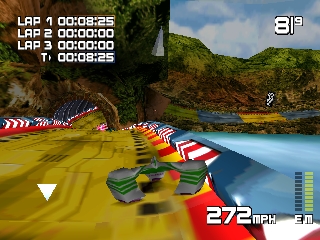
Killer Loop is a racing game released for the PlayStation in the late 1990s. Developed by the team behind other niche titles, it falls within the futuristic racing genre, reminiscent of games like Wipeout and F-Zero. Its distinct aesthetic and fast-paced gameplay make it a title worth exploring for fans of retro racing games.
In Killer Loop, players race high-speed hovercrafts on various tracks filled with twists, turns, and obstacles. The game emphasizes precision driving and quick reflexes, as players must navigate through challenging environments while competing against AI opponents. Utilizing power-ups and managing speed boosts are crucial elements to gain an edge in races, adding a layer of strategy to the fast-paced action.
Though Killer Loop may not have the same level of recognition as some of its contemporaries, it offers a unique experience for racing enthusiasts. Its strong emphasis on speed and handling captures the essence of the era's arcade racing titles. For those looking to expand their library with lesser-known gems, Killer Loop serves as an interesting alternative to the more mainstream racing games of the late 90s.
GAME INFO
- Platform
- PlayStation PSX
- Genre
- Racing
- Publisher
- Crave Entertainment
- Released
- 1998
- Players
- 1-2
- Region
- Japan, USA, Europe
How to play Killer Loop online
To get started with Killer Loop, begin by selecting your hovercraft and track from the main menu. Once you’ve made your selections, familiarize yourself with the controls as you will need to master steering and acceleration to perform well. The core gameplay loop involves racing against AI opponents while navigating through intricate tracks filled with obstacles and power-ups.
As you progress, focus on collecting power-ups that can give you speed boosts or other advantages. Timing your use of these power-ups can significantly impact your performance in races. Don't forget to practice on different tracks to understand their layouts better, as this knowledge will help you shave seconds off your lap times.
CONTROLS
Controls
- Arrow Keys — D-Pad / Movement
- X — Cross ( × )
- S — Square ( □ )
- Z — Triangle ( △ )
- A — Circle ( ○ )
- Q — L1 shoulder
- E — R1 shoulder
- Enter — Start
- V — Select
Killer Loop FAQ
Roughly how long does it take to finish Killer Loop?
The game can typically be completed in a few hours, depending on player skill and familiarity with racing games. Completing all tracks and modes may take longer for those looking for a thorough experience.
Can players save progress in Killer Loop?
The game does not feature a traditional save system, so players may need to complete races in a single sitting. This can be a challenge, especially for those new to the mechanics or the tracks.
Is Killer Loop exclusive to PlayStation PSX or did it appear on other systems?
Killer Loop is primarily known as a PlayStation-exclusive title, and there are no widely documented releases on other systems. It remains a unique experience for fans of the PSX library.
You may also like
All PlayStation PSX games











GAME INFO
- Platform
- PlayStation PSX
- Genre
- Racing
- Publisher
- Crave Entertainment
- Released
- 1998
- Players
- 1-2
- Region
- Japan, USA, Europe
COMMENTS (0)
No comments yet. Be the first to share your thoughts.