The game loads when you press Play · press “Play Now” inside the game if it asks.
Johnny Bazookatone
Johnny Bazookatone
Johnny Bazookatone on PSX
- PlayStation PSX
- Platformer
- 5· 0 votes
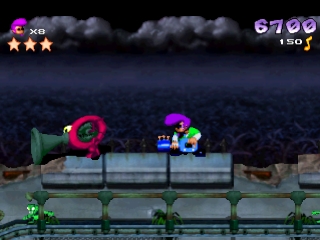
Johnny Bazookatone is a platform game that was released on the PlayStation (PSX) in the late 1990s. The game was developed by a lesser-known studio, and while it didn't achieve widespread acclaim, it has its charm within the genre. As a platformer, it draws on conventions of the time, featuring colorful graphics and action-oriented gameplay that was popular on the system.
In Johnny Bazookatone, players navigate through various levels filled with obstacles and enemies. The gameplay focuses on jumping, running, and attacking, which are common mechanics in platformers of the era. Players control the titular character as they traverse through vibrant environments, tackling challenges and collecting items along the way. The levels are designed to test timing and reflexes, with an emphasis on platforming skills.
This game is worth trying today for those who appreciate retro platformers, especially from the PSX era. While it may not have the same recognition as titles like Crash Bandicoot or Spyro, it offers a nostalgic experience and a glimpse into the variety of games available during that time. If you're a fan of classic platforming action, Johnny Bazookatone can provide a fun, albeit simple, adventure that showcases the charm of the genre.
GAME INFO
- Platform
- PlayStation PSX
- Genre
- Platformer
- Publisher
- U.S. Gold
- Released
- 1995
How to play Johnny Bazookatone online
Getting started in Johnny Bazookatone involves selecting your game mode from the main menu, which is presented in a straightforward format. Players will typically begin by familiarizing themselves with the controls, as mastering the jumping and attacking mechanics is crucial for progressing through the levels. Once you start a level, the core loop revolves around navigating platforms, defeating enemies, and collecting power-ups to enhance your abilities.
As you play, timing your jumps and attacks becomes essential. Each level presents unique challenges, including moving platforms and various enemy types that require different strategies to defeat. Pay attention to the layout of each stage, as exploring can lead to hidden items or shortcuts. The game rewards skillful play, so practice makes perfect.
CONTROLS
Controls
- Arrow Keys — D-Pad / Movement
- X — Cross ( × )
- S — Square ( □ )
- Z — Triangle ( △ )
- A — Circle ( ○ )
- Q — L1 shoulder
- E — R1 shoulder
- Enter — Start
- V — Select
Johnny Bazookatone FAQ
Who developed Johnny Bazookatone?
The developer of Johnny Bazookatone is not widely documented, and specific details about the development team remain scarce.
Which regions was Johnny Bazookatone released in?
There is limited information on the regional releases of Johnny Bazookatone, and it seems to have primarily circulated in Japan without a significant global launch.
Is there anything iconic or memorable about Johnny Bazookatone?
While not particularly iconic, Johnny Bazookatone is remembered for its quirky character design and colorful levels, reflecting the playful aesthetics common in platformers of its time.
You may also like
All PlayStation PSX games











GAME INFO
- Platform
- PlayStation PSX
- Genre
- Platformer
- Publisher
- U.S. Gold
- Released
- 1995
COMMENTS (0)
No comments yet. Be the first to share your thoughts.