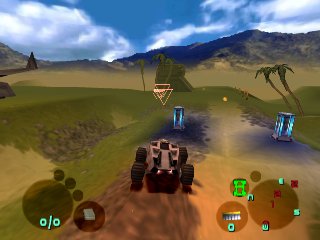
The game loads when you press Play · press “Play Now” inside the game if it asks.
Infestation
Infestation
Infestation - Action Classic
- PlayStation PSX
- Action
- Unknown
- 5· 0 votes
Infestation is a unique title for the PlayStation PSX that emerged during the late 90s. This game is known for its blend of action and strategy mechanics, appealing to fans of both genres. While specific details about the developers are not widely documented, it reflects the experimental spirit of its era, where various concepts were explored on the platform.
In Infestation, players engage in a mix of action and strategic gameplay. The mechanics revolve around managing resources and units, which adds a layer of depth beyond simple combat. The controls are designed to facilitate quick decision-making, making the experience engaging, though it may take some time to master the nuances of the game.
What makes Infestation worth checking out today is its niche appeal and the way it encapsulates the creativity of the PSX era. It's not a mainstream title, but it offers a different flavor compared to the more popular games of its time. For those interested in exploring the lesser-known gems of retro gaming, Infestation provides a glimpse into the experimentation that characterized many titles on the PlayStation.
GAME INFO
- Platform
- PlayStation PSX
- Genre
- Action
How to play Infestation online
Getting started in Infestation involves familiarizing yourself with the controls and the game’s basic mechanics. The initial screen may present options in Japanese, so players should look for the option to start a new game, typically located at the top of the menu. Once in-game, the focus will be on managing your units and resources effectively, which is key to progressing through the levels.
The core loop of the game revolves around strategic positioning and resource management, often requiring quick thinking as new challenges arise. Players will need to adapt their strategies based on the evolving gameplay, making decisions that can lead to success or failure. Understanding the strengths and weaknesses of your units will be crucial as you navigate through the various stages of the game.
CONTROLS
Controls
- Arrow Keys — D-Pad / Movement
- X — Cross ( × )
- S — Square ( □ )
- Z — Triangle ( △ )
- A — Circle ( ○ )
- Q — L1 shoulder
- E — R1 shoulder
- Enter — Start
- V — Select
Infestation FAQ
Is Infestation considered easy to pick up or challenging?
The game presents a moderate challenge, especially for players unfamiliar with its mechanics. While the controls are straightforward, mastering the strategic elements can take time and practice.
Roughly how long does it take to finish Infestation?
The completion time can vary based on the player's skill level and familiarity with similar games. Generally, it may take several hours to fully experience the game and reach its conclusion.
Is Infestation exclusive to PlayStation PSX or did it appear on other systems?
This title is primarily associated with the PlayStation PSX and does not have widely known releases on other gaming systems. It remains a unique experience for fans of the PSX platform.
You may also like
All PlayStation PSX games











GAME INFO
- Platform
- PlayStation PSX
- Genre
- Action
COMMENTS (0)
No comments yet. Be the first to share your thoughts.