The game loads when you press Play · press “Play Now” inside the game if it asks.
Hogs of War
Hogs of War
Hogs of War Overview
- PlayStation PSX
- Strategy
- 5· 0 votes
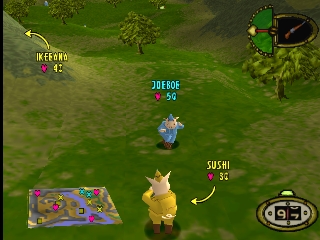
Hogs of War is a tactical turn-based strategy game released for the PlayStation in 2000. Developed by Infogrames and based on the popular genre conventions of the time, it presents a unique blend of humor and strategy, featuring anthropomorphic pigs in a war setting. The game combines elements of strategy and action, making it a notable entry in the PSX library.
In Hogs of War, players take command of a squad of pigs, engaging in tactical battles across various maps. The gameplay revolves around positioning, utilizing different weapons, and employing strategic maneuvers to defeat opposing teams. Players can select from a variety of units, each with unique abilities, and the turn-based nature allows for thoughtful planning and execution of strategies.
This title is worth exploring today for its quirky charm and the nostalgia it brings to fans of classic strategy games. While it may not have the same level of recognition as other titles from the era, its combination of humor and tactical gameplay sets it apart. For those who appreciate strategy games with a lighthearted twist, Hogs of War offers a fun experience that remains enjoyable even years after its release.
GAME INFO
- Platform
- PlayStation PSX
- Genre
- Strategy
- Released
- 2000
- Players
- 1-2
- Region
- Worldwide
How to play Hogs of War online
Getting started in Hogs of War involves selecting a campaign or a single battle mode. Players choose their squad of pigs and decide on a strategy for the upcoming battles. The core loop consists of taking turns to move your units, attack opponents, and leverage the environment to gain an advantage.
As you play, it's important to familiarize yourself with the unique abilities of each pig class and the various weapons at your disposal. Positioning your units effectively on the battlefield can make a significant difference in the outcome of each skirmish. Keep an eye on the health and morale of your team, as these factors will influence your overall performance in the game.
CONTROLS
Controls
- Arrow Keys — D-Pad / Movement
- X — Cross ( × )
- S — Square ( □ )
- Z — Triangle ( △ )
- A — Circle ( ○ )
- Q — L1 shoulder
- E — R1 shoulder
- Enter — Start
- V — Select
Hogs of War FAQ
What type of game is Hogs of War?
A tactical turn-based strategy game featuring anthropomorphic pigs in a humorous war setting.
What makes Hogs of War stand out among PlayStation PSX titles of its era?
Its unique combination of humor and strategic gameplay, along with its quirky characters, sets it apart from many other titles of the time.
Is there anything iconic or memorable about Hogs of War?
The game's humorous take on warfare and its charming pig characters have made it memorable for those who played it during its original release.
You may also like
All PlayStation PSX games











GAME INFO
- Platform
- PlayStation PSX
- Genre
- Strategy
- Released
- 2000
- Players
- 1-2
- Region
- Worldwide
COMMENTS (0)
No comments yet. Be the first to share your thoughts.