The game loads when you press Play · press “Play Now” inside the game if it asks.
Hebereke's Popoitto
Hebereke's Popoitto
Inside Hebereke's Popoitto
- PlayStation PSX
- Platformer
- 5· 0 votes
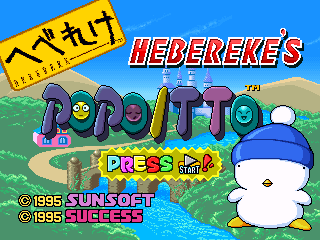
Hebereke's Popoitto is a quirky puzzle-platformer released for the PlayStation (PSX) in Japan. Developed by Sunsoft, it is part of the Hebereke series, known for its unique art style and engaging gameplay. This title is not a hack or mod, but rather an official release that showcases the charm of early 3D platforming with a distinctly Japanese flavor.
In Hebereke's Popoitto, players navigate through vibrant levels filled with colorful characters and obstacles. The main objective revolves around collecting various items while overcoming platforming challenges. The game incorporates puzzle elements that require players to think critically about their approach, making use of the game's mechanics to progress through increasingly difficult stages.
What makes Hebereke's Popoitto worth trying today is its nostalgic appeal and distinctive art style, which sets it apart from other titles of its era. While it may not have the same level of recognition as blockbusters from the time, it offers a slice of the unique creativity found in Japanese game design during the 90s. Fans of the platforming genre will appreciate its charm and the opportunity to experience a lesser-known classic.
GAME INFO
- Platform
- PlayStation PSX
- Genre
- Platformer
- Publisher
- Marubeni
- Developer
- Sun Corporation
- Released
- 1998
- Players
- 1
- Region
- Japan
How to play Hebereke's Popoitto online
To get started with Hebereke's Popoitto, choose your character and begin your adventure through the game's colorful levels. The core loop involves moving through stages, collecting items, and solving puzzles to advance. As you play, you'll encounter various obstacles that require strategic thinking and timing to overcome.
New players should familiarize themselves with the basic controls and mechanics early on. Pay attention to the items you collect, as they can help you navigate through tougher sections of the game. Keep in mind that the menus are in Japanese, so it might be helpful to have a translation guide handy or familiarize yourself with common terms to ease navigation.
CONTROLS
Controls
- Arrow Keys — D-Pad / Movement
- X — Cross ( × )
- S — Square ( □ )
- Z — Triangle ( △ )
- A — Circle ( ○ )
- Q — L1 shoulder
- E — R1 shoulder
- Enter — Start
- V — Select
Hebereke's Popoitto FAQ
Is there anything iconic or memorable about Hebereke's Popoitto?
The game is known for its whimsical art style and catchy music, which contribute to its unique charm. It also features the beloved character Hebereke, adding to its appeal among fans of the series.
Can players save progress in Hebereke's Popoitto?
The game does not have a save feature, which means players need to complete levels in one sitting. This can add a layer of challenge, as players must be prepared to tackle the game without the ability to save their progress.
Which regions was Hebereke's Popoitto released in?
Hebereke's Popoitto was released exclusively in Japan, making it a title that may not be as widely known outside of that region. This limited release contributes to its niche status among retro gaming enthusiasts.
You may also like
All PlayStation PSX games











GAME INFO
- Platform
- PlayStation PSX
- Genre
- Platformer
- Publisher
- Marubeni
- Developer
- Sun Corporation
- Released
- 1998
- Players
- 1
- Region
- Japan
COMMENTS (0)
No comments yet. Be the first to share your thoughts.