The game loads when you press Play · press “Play Now” inside the game if it asks.
Gear Fighter Dendoh
Gear Fighter Dendoh
Gear Fighter Dendoh Overview
- PlayStation PSX
- Action
- 5· 0 votes
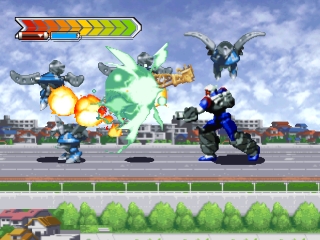
Gear Fighter Dendoh is an action game that was released for the PlayStation in Japan. Developed by Bandai, this title is based on the popular anime series of the same name. While the game was released exclusively in Japan, it captures the essence of the mech genre that was prevalent during the late 90s.
In Gear Fighter Dendoh, players take control of giant robots, engaging in battles against various enemies. The gameplay revolves around combat mechanics typical of the action genre, with players maneuvering their mechs to execute attacks and dodges. The game features a level-based structure, where players progress through different stages, facing increasingly difficult foes as they advance.
The game may appeal to fans of the anime and those who appreciate mech-based action games, although it may not have the same level of recognition as other titles on the PlayStation. Its niche appeal and specific Japanese context make it a unique entry in any retro gaming collection. While it may lack some depth compared to more widely known titles, its charm lies in its simplicity and its connection to the Dendoh franchise.
GAME INFO
- Platform
- PlayStation PSX
- Genre
- Action
- Players
- 1
- Region
- Japan
How to play Gear Fighter Dendoh online
To get started with Gear Fighter Dendoh, boot up the game and choose your mech. Since this title is in Japanese, you may find it helpful to familiarize yourself with the basic menu layout, which typically involves selecting options with the confirm button (X) and canceling with the B button (S). Once you select your mech, prepare for battle as you navigate through levels.
The core gameplay loop consists of battling enemies while managing your mech's health and abilities. As you progress, you’ll encounter various enemies that require different strategies to defeat. Keep an eye on your health and use your attacks wisely to ensure you can defeat the bosses that await at the end of each level. The straightforward controls make it accessible, but mastering the timing and combos will enhance your experience.
CONTROLS
Controls
- Arrow Keys — D-Pad / Movement
- X — Cross ( × )
- S — Square ( □ )
- Z — Triangle ( △ )
- A — Circle ( ○ )
- Q — L1 shoulder
- E — R1 shoulder
- Enter — Start
- V — Select
Gear Fighter Dendoh FAQ
Who developed Gear Fighter Dendoh?
The game was developed by Bandai, known for creating various titles based on popular anime franchises.
What makes Gear Fighter Dendoh stand out among PlayStation PSX titles of its era?
Its connection to the Dendoh anime series provides a unique context, appealing to fans of the show, though it may not be as widely recognized as other titles.
Does Gear Fighter Dendoh have a multiplayer or co-op mode?
There is no widely documented information about a multiplayer or co-op mode in Gear Fighter Dendoh, as it primarily focuses on single-player gameplay.
You may also like
All PlayStation PSX games











GAME INFO
- Platform
- PlayStation PSX
- Genre
- Action
- Players
- 1
- Region
- Japan
COMMENTS (0)
No comments yet. Be the first to share your thoughts.