The game loads when you press Play · press “Play Now” inside the game if it asks.
Duke Nukem: Time to Kill
Duke Nukem: Time to Kill
What is Duke Nukem: Time to Kill?
- PlayStation PSX
- Action
- 5· 0 votes
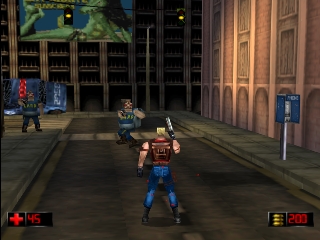
Duke Nukem: Time to Kill is a third-person shooter developed for the PlayStation console. Released in 1998, this title was part of the larger Duke Nukem franchise, known for its over-the-top action and humor. The game combines elements of shooting and exploration, fitting into the action genre that defined much of the era's gaming landscape.
In this game, players take on the role of Duke Nukem as he battles through various levels filled with enemies and obstacles. The gameplay involves navigating through 3D environments, utilizing a variety of weapons to defeat foes, and solving environmental puzzles to progress. The structure is mission-based, where players must complete objectives within each level, which often requires both combat prowess and strategic thinking.
What makes Duke Nukem: Time to Kill worth exploring today is its place in the evolution of 3D action games. While it may not be as polished as some of its contemporaries, it offers a nostalgic look back at the late 90s gaming culture. Fans of retro shooters will appreciate its blend of humor and action, even if it may feel simplistic compared to modern titles. It's a piece of gaming history that reflects the experimentation of its time.
GAME INFO
- Platform
- PlayStation PSX
- Genre
- Action
- Publisher
- Atari, Inc.
- Developer
- n-Space
- Released
- 1998
- Players
- 1
- Region
- USA
How to play Duke Nukem: Time to Kill online
To get started with Duke Nukem: Time to Kill, first, load the game and familiarize yourself with the controls. The main objective is to complete missions that involve defeating enemies and navigating through various levels. Explore your surroundings carefully, as there are often hidden items and power-ups that will aid you in your quest.
As you progress, you'll encounter different types of enemies and challenges that require quick reflexes and strategic use of your weapons. Pay attention to your health and ammo, as resource management is key. The game rewards exploration, so don't rush through levels; take your time to find secrets and complete objectives efficiently.
CONTROLS
Controls
- Arrow Keys — D-Pad / Movement
- X — Cross ( × )
- S — Square ( □ )
- Z — Triangle ( △ )
- A — Circle ( ○ )
- Q — L1 shoulder
- E — R1 shoulder
- Enter — Start
- V — Select
Duke Nukem: Time to Kill FAQ
Who developed Duke Nukem: Time to Kill?
The game was developed by 3D Realms, a studio known for creating the Duke Nukem franchise and other classic titles.
What makes Duke Nukem: Time to Kill stand out among PlayStation PSX titles of its era?
Its blend of third-person shooting mechanics and exploration sets it apart, along with the signature humor and style of the Duke Nukem series.
Is there anything iconic or memorable about Duke Nukem: Time to Kill?
The game is remembered for its unique level design and humorous dialogue, which were characteristic of the Duke Nukem series, making it a nostalgic experience for fans.
You may also like
All PlayStation PSX games











GAME INFO
- Platform
- PlayStation PSX
- Genre
- Action
- Publisher
- Atari, Inc.
- Developer
- n-Space
- Released
- 1998
- Players
- 1
- Region
- USA
COMMENTS (0)
No comments yet. Be the first to share your thoughts.