The game loads when you press Play · press “Play Now” inside the game if it asks.
Dare Devil Derby 3D
Dare Devil Derby 3D
What is Dare Devil Derby 3D?
- PlayStation PSX
- Racing
- 5· 0 votes
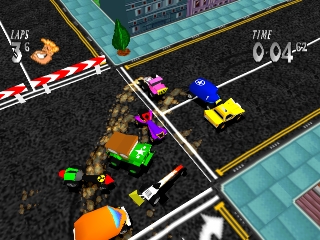
Dare Devil Derby 3D is a racing game released for the PlayStation in 1997. Developed by a lesser-known studio, the game embodies the arcade racing genre typical of the era. While it may not have achieved mainstream success, it offers a unique blend of speed and quirky visuals that were characteristic of many PSX titles from that time.
In Dare Devil Derby 3D, players control small vehicles racing on a variety of tracks filled with obstacles and jumps. The gameplay focuses on navigating these courses while avoiding hazards and attempting to outpace opponents. With its simple mechanics, players can expect an accessible experience that emphasizes fun over realism, making it a solid choice for casual gaming sessions.
Today, Dare Devil Derby 3D holds a niche appeal among retro gaming enthusiasts. While it may not compete with heavyweights like Gran Turismo or Mario Kart, it offers a charming glimpse into the racing genre of the late 90s. The game is worth trying for those interested in exploring lesser-known titles, and it provides an enjoyable experience that reflects the playful spirit of its time.
GAME INFO
- Platform
- PlayStation PSX
- Genre
- Racing
- Released
- 1997
How to play Dare Devil Derby 3D online
To get started in Dare Devil Derby 3D, first select your vehicle and track from the main menu. Familiarize yourself with the controls, as you'll need to navigate tight turns and obstacles. The game features a straightforward racing structure where your primary goal is to finish ahead of your opponents while managing your speed and handling.
The core gameplay loop involves racing against AI opponents across various tracks. Pay attention to the layout of each course, as they can vary in complexity. Collecting power-ups and avoiding hazards are essential for maintaining your lead. As you progress, you'll unlock additional content and tracks, which adds to the replayability of the game.
CONTROLS
Controls
- Arrow Keys — D-Pad / Movement
- X — Cross ( × )
- S — Square ( □ )
- Z — Triangle ( △ )
- A — Circle ( ○ )
- Q — L1 shoulder
- E — R1 shoulder
- Enter — Start
- V — Select
Dare Devil Derby 3D FAQ
Who developed Dare Devil Derby 3D?
The developer of Dare Devil Derby 3D is not widely documented, making it difficult to attribute to a specific studio.
What makes Dare Devil Derby 3D stand out among PlayStation PSX titles of its era?
The game is notable for its quirky visuals and arcade-style racing mechanics, which provide a light-hearted alternative to more serious racing titles of the time.
Does Dare Devil Derby 3D have a multiplayer or co-op mode?
There is no widely documented information indicating that Dare Devil Derby 3D features a multiplayer or co-op mode.
You may also like
All PlayStation PSX games











GAME INFO
- Platform
- PlayStation PSX
- Genre
- Racing
- Released
- 1997
COMMENTS (0)
No comments yet. Be the first to share your thoughts.