CHOOSE A VERSION
2 versions · same consoleChoose an original release, regional version, revision, bootleg or clearly labelled ROM hack/mod, then press Play. Hacks may change the gameplay. Switching versions restarts the player.
Selected: Default · Original · Japan
The game loads when you press Play · press “Play Now” inside the game if it asks.
Cleopatra Fortune
Cleopatra Fortune
Cleopatra Fortune - Puzzle Classic
- PlayStation PSX
- Puzzle
- 5· 0 votes
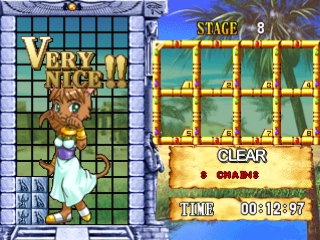
Cleopatra Fortune is a puzzle game released for the PlayStation PSX in Japan. Developed by the Japanese company, Success, the game originally came out in 1996. It combines classic puzzle elements with a unique theme centered around ancient Egyptian imagery, making it a distinctive title in the puzzle genre for the platform.
In Cleopatra Fortune, players are tasked with matching colored blocks to clear them from the screen. The game employs a straightforward mechanic where players must strategically place falling blocks to create combinations, similar to other puzzle games of its time. As you progress, the challenges increase, and players must think quickly to manage the falling blocks and prevent the screen from filling up.
This title is worth exploring today for those who appreciate retro puzzle games and want to experience a lesser-known gem from the PSX library. While it may not have the widespread recognition of other classics, its unique theme and gameplay mechanics offer a satisfying experience for fans of the genre. Compared to contemporaries, Cleopatra Fortune holds its own with engaging gameplay that can still be enjoyed by puzzle enthusiasts looking for something different.
GAME INFO
- Platform
- PlayStation PSX
- Genre
- Puzzle
- Publisher
- Altron
- Developer
- Taito
- Released
- 1996
- Players
- 1
- Region
- Japan
How to play Cleopatra Fortune online
Getting started in Cleopatra Fortune involves selecting your game mode from the main menu, which is presented in Japanese. Familiarizing yourself with the controls is essential since you'll need to react quickly to the falling blocks. The core gameplay loop revolves around matching colors and clearing blocks, so focus on creating combinations as they drop.
As you play, pay attention to the speed and patterns of the falling blocks. The key to success is anticipating where to place your blocks to maximize your clearing potential. While the menus may be in Japanese, the gameplay itself is intuitive enough for new players to pick up and enjoy without too much difficulty.
CONTROLS
Controls
- Arrow Keys — D-Pad / Movement
- X — Cross ( × )
- S — Square ( □ )
- Z — Triangle ( △ )
- A — Circle ( ○ )
- Q — L1 shoulder
- E — R1 shoulder
- Enter — Start
- V — Select
Cleopatra Fortune FAQ
Who developed Cleopatra Fortune?
The game was developed by Success, a Japanese company known for creating various titles in the puzzle genre.
Which regions was Cleopatra Fortune released in?
It was primarily released in Japan, and there is no widely documented evidence of a release in other regions.
Is Cleopatra Fortune exclusive to PlayStation PSX or did it appear on other systems?
The game is primarily known for its PlayStation PSX release, and there is no evidence of it being released on other systems.
You may also like
All PlayStation PSX games











GAME INFO
- Platform
- PlayStation PSX
- Genre
- Puzzle
- Publisher
- Altron
- Developer
- Taito
- Released
- 1996
- Players
- 1
- Region
- Japan
COMMENTS (0)
No comments yet. Be the first to share your thoughts.