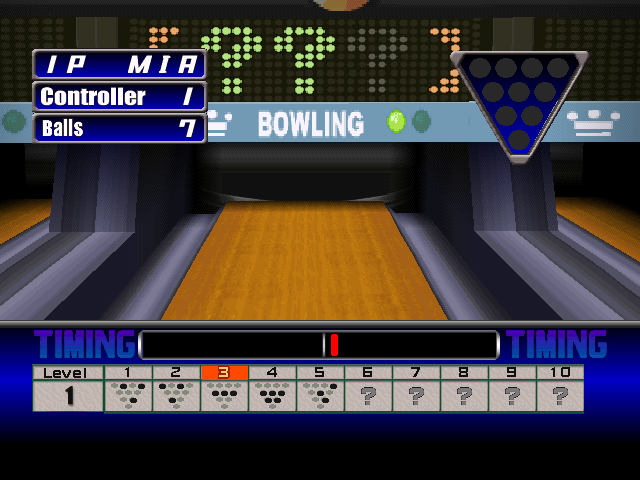
The game loads when you press Play · press “Play Now” inside the game if it asks.
Bowling
Bowling
Bowling - Sports Classic
- PlayStation PSX
- Sports
- Unknown
- 5· 0 votes
GAME INFO
- Platform
- PlayStation PSX
- Genre
- Sports
How to play Bowling online
To get started in Bowling, first select your bowling ball and choose the lane you want to play on. Then, aim your shot using the D-Pad to line up with the pins. Once you're set, press the A button to throw the ball. Timing and precision are key, so practice your throws to improve your scores.
The core gameplay revolves around completing frames by knocking down pins. Each game typically consists of ten frames, and you will score based on how many pins you knock down. Keep an eye on your score and aim to achieve strikes or spares for higher points. This straightforward approach makes it easy for newcomers to pick up, but mastering the game will take some practice.
CONTROLS
Controls
- Arrow Keys — D-Pad / Movement
- X — Cross ( × )
- S — Square ( □ )
- Z — Triangle ( △ )
- A — Circle ( ○ )
- Q — L1 shoulder
- E — R1 shoulder
- Enter — Start
- V — Select
Bowling FAQ
Who developed Bowling?
Information about the developer of Bowling is not widely documented.
Is Bowling considered easy to pick up or challenging?
The game is generally easy to pick up due to its simple controls and straightforward mechanics. However, mastering the precision required for high scores can present a challenge.
Does Bowling have a multiplayer or co-op mode?
Bowling does not have a widely recognized multiplayer or co-op mode, focusing instead on single-player gameplay.
You may also like
All PlayStation PSX games


GAME INFO
- Platform
- PlayStation PSX
- Genre
- Sports
COMMENTS (0)
No comments yet. Be the first to share your thoughts.