The game loads when you press Play · press “Play Now” inside the game if it asks.
Blast Chamber
Blast Chamber
Getting to Know Blast Chamber
- PlayStation PSX
- Action
- 5· 0 votes
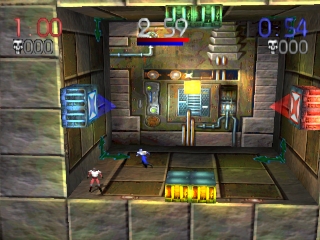
Blast Chamber is a unique action game released for the PlayStation in 1997, developed by the team at 3DO. Known for its multiplayer experience, it combines elements of puzzle-solving and strategic gameplay. The game stands out in the genre for its innovative mechanics, which involve manipulating a central chamber to solve challenges.
In Blast Chamber, players engage in a competitive environment where they must navigate a 3D arena filled with obstacles and traps. The core gameplay revolves around controlling a character within a rotating chamber while trying to complete various tasks, often against a timer or competing players. Strategy is key, as players must think quickly and adapt to the constantly changing layout of the chamber, making use of both physical skills and problem-solving abilities.
This title is worth exploring for fans of retro gaming who appreciate unique mechanics and competitive gameplay. While it might not be as widely recognized as other titles from the era, it offers a distinct experience that can be quite enjoyable. If you're fond of games that challenge both your reflexes and your mind, Blast Chamber is a hidden gem from the PSX library that deserves a try.
GAME INFO
- Platform
- PlayStation PSX
- Genre
- Action
- Publisher
- Activision
- Released
- 1997
- Players
- 1-2
- Region
- Japan, USA
How to play Blast Chamber online
Getting started in Blast Chamber involves selecting your character and understanding the layout of the chamber you'll be navigating. The gameplay is centered around completing objectives while managing the rotating mechanics of the chamber. Familiarize yourself with the controls and the environment, as the layout can change rapidly.
As you play, focus on mastering the movement and timing needed to avoid traps and interact with various elements in the chamber. The core loop involves solving puzzles while competing against others, which adds an exciting layer to the gameplay. Keep an eye out for power-ups or features that can give you an edge in any challenge.
CONTROLS
Controls
- Arrow Keys — D-Pad / Movement
- X — Cross ( × )
- S — Square ( □ )
- Z — Triangle ( △ )
- A — Circle ( ○ )
- Q — L1 shoulder
- E — R1 shoulder
- Enter — Start
- V — Select
Blast Chamber FAQ
Which regions was Blast Chamber released in?
The game was primarily released in Japan and later in the USA, making it available to a broader audience.
Is Blast Chamber exclusive to PlayStation PSX or did it appear on other systems?
Blast Chamber is exclusive to the PlayStation PSX and did not see releases on other platforms.
In what year was Blast Chamber originally released?
The game was originally released in 1997, marking its entry into the competitive gaming landscape of the late 90s.
You may also like
All PlayStation PSX games











GAME INFO
- Platform
- PlayStation PSX
- Genre
- Action
- Publisher
- Activision
- Released
- 1997
- Players
- 1-2
- Region
- Japan, USA
COMMENTS (0)
No comments yet. Be the first to share your thoughts.