The game loads when you press Play · press “Play Now” inside the game if it asks.
Beyblade: Let it Rip!
Beyblade: Let it Rip!
Beyblade: Let it Rip! - Action Classic
- PlayStation PSX
- Action
- 5· 0 votes
Beyblade: Let it Rip! is a game based on the popular spinning top toy franchise, released for the PlayStation PSX. It came out during the early 2000s, a time when many franchises were making the leap from toys to video games. Developed by KID, this title falls into the action genre, focusing on battles involving spinning tops known as Beyblades.
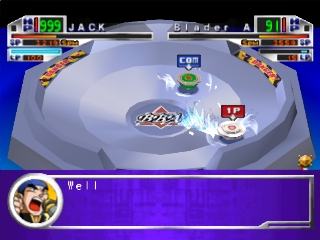
In the game, players engage in Beyblade battles, controlling their tops in various arenas. The objective is to outspin and knock out the opponent's Beyblade. Players can customize their Beyblades with different parts to enhance performance, which adds a layer of strategy to the gameplay. The controls are straightforward, allowing for quick matches that can be enjoyed in short bursts.
Today, Beyblade: Let it Rip! holds a niche place in retro gaming. It may not compete with the heavyweights of its era, but it offers a unique blend of toy-based mechanics and arcade-style action. Fans of the Beyblade series or collectors of PSX games might find it a worthy addition to their library, especially for those nostalgic for the franchise or interested in exploring lesser-known titles from that period.
GAME INFO
- Platform
- PlayStation PSX
- Genre
- Action
How to play Beyblade: Let it Rip! online
Getting Started: To start playing Beyblade: Let it Rip!, choose your Beyblade and customize it with different parts to improve its abilities. Once you enter a match, the core loop revolves around spinning your top to outlast or defeat your opponent. Timing and strategy are key, as you'll need to be aware of your Beyblade's strengths and weaknesses against different foes.
As you play, you can experiment with different Beyblade configurations and learn the mechanics of each part. This customization aspect is vital for improving your gameplay and gaining an edge in battles. Keep in mind that the game may present menus in Japanese, so familiarity with basic terms or using a translation guide can help navigate options effectively.
CONTROLS
Controls
- Arrow Keys — D-Pad / Movement
- X — Cross ( × )
- S — Square ( □ )
- Z — Triangle ( △ )
- A — Circle ( ○ )
- Q — L1 shoulder
- E — R1 shoulder
- Enter — Start
- V — Select
Beyblade: Let it Rip! FAQ
Is Beyblade: Let it Rip! exclusive to PlayStation PSX or did it appear on other systems?
This title is primarily known for its release on PlayStation PSX and does not have widely documented versions on other systems.
What makes Beyblade: Let it Rip! stand out among PlayStation PSX titles of its era?
The game offers a unique take on the Beyblade franchise, combining action with strategic customization of spinning tops. Its blend of toy-based gameplay and arcade action makes it a distinct title from others released during that time.
Who developed Beyblade: Let it Rip!?
The game was developed by KID, a company known for creating several titles based on popular franchises, including this one focused on Beyblade.
You may also like
All PlayStation PSX games











GAME INFO
- Platform
- PlayStation PSX
- Genre
- Action
COMMENTS (0)
No comments yet. Be the first to share your thoughts.