The game loads when you press Play · press “Play Now” inside the game if it asks.
Apocalypse
Apocalypse
Inside Apocalypse
- PlayStation PSX
- Run and Gun
- 5· 0 votes
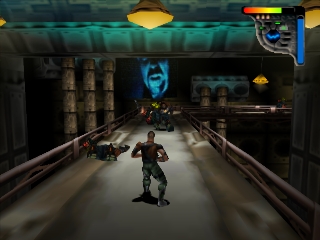
Apocalypse is a run-and-gun action game released for the PlayStation in the late 1990s. Developed by Neversoft and published by Activision, it features a post-apocalyptic setting that was relatively new for games of that era. This title showcases the unique blend of 3D graphics and intense shooting mechanics that defined many PSX games during that time.
In Apocalypse, players control a character navigating through various levels filled with enemies and obstacles. The gameplay revolves around shooting enemies while avoiding incoming attacks, and players can use a range of weapons to dispatch foes. The game also incorporates some platforming elements, requiring players to jump between platforms and avoid hazards while progressing through the stages.
What makes Apocalypse worth trying today is its nostalgic charm and the way it captures the essence of 90s action games. While it may not have the same level of recognition as other titles from its time, it offers a unique experience with its combination of shooting and platforming mechanics. Fans of retro gaming and those interested in the evolution of action games will find something appealing in its design and gameplay style.
GAME INFO
- Platform
- PlayStation PSX
- Genre
- Run and Gun
- Released
- 1998
- Players
- 1
- Region
- USA
How to play Apocalypse online
To start playing Apocalypse, choose a mode from the main menu, which may include options for starting a new game or continuing progress. As you begin, familiarize yourself with the controls and the layout of the levels. The core loop involves moving through stages, defeating enemies, and collecting items while avoiding damage.
Pay attention to your ammunition and health, as managing these resources is crucial for survival. Each level culminates in a boss fight, so prepare to adapt your strategies as you progress. While the game is accessible, mastering the controls and understanding enemy patterns will enhance your experience significantly.
CONTROLS
Controls
- Arrow Keys — D-Pad / Movement
- X — Cross ( × )
- S — Square ( □ )
- Z — Triangle ( △ )
- A — Circle ( ○ )
- Q — L1 shoulder
- E — R1 shoulder
- Enter — Start
- V — Select
Apocalypse FAQ
Is Apocalypse exclusive to PlayStation PSX or did it appear on other systems?
Apocalypse was primarily released for the PlayStation, and there are no widely documented versions on other systems.
Can players save progress in Apocalypse?
The game does not have a traditional save feature; players must complete levels without the ability to save mid-game.
Who developed Apocalypse?
Neversoft was the studio behind the development of Apocalypse, known for their work on various other titles during that era.
You may also like
All PlayStation PSX games











GAME INFO
- Platform
- PlayStation PSX
- Genre
- Run and Gun
- Released
- 1998
- Players
- 1
- Region
- USA
COMMENTS (0)
No comments yet. Be the first to share your thoughts.