The game loads when you press Play · press “Play Now” inside the game if it asks.
Actua Soccer - Club Edition
Actua Soccer - Club Edition
Actua Soccer - Club Edition Overview
- PlayStation PSX
- Sports
- 5· 0 votes
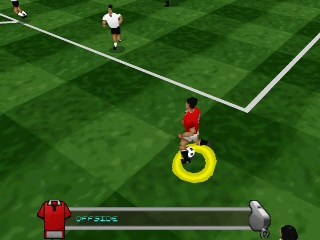
Actua Soccer - Club Edition is a sports simulation game released for the PlayStation PSX. Developed by Gremlin Interactive, this title hit the market in the late 1990s, offering an engaging soccer experience for fans of the genre. It's part of the Actua Soccer series, which aimed to provide a more realistic take on football games during an era dominated by arcade-style soccer titles.
In this game, players take control of various soccer clubs and compete in matches using a combination of strategic play and skillful maneuvers. The gameplay revolves around familiar soccer mechanics, including passing, shooting, and defending, all presented in a 3D environment. Players can choose different teams and engage in various match formats, making the experience feel dynamic and competitive.
Today, Actua Soccer - Club Edition holds a nostalgic charm for those who appreciate retro gaming. While it may not compete with the more popular titles of its time, it offers a glimpse into the evolution of sports games on the PlayStation. Its unique mechanics and club-focused gameplay make it an interesting title for fans of soccer games looking to explore the history of the genre.
GAME INFO
- Platform
- PlayStation PSX
- Genre
- Sports
- Released
- 1998
- Players
- 1-2
- Region
- Worldwide
How to play Actua Soccer - Club Edition online
To get started in Actua Soccer - Club Edition, first select your preferred team from the menu. Once you’ve chosen a club, you can set up a match or dive into a tournament. The core loop involves playing matches where you control your team, aiming to score goals while defending against your opponent.
Familiarize yourself with the controls as they will be vital for executing passes, shots, and tackles effectively. Timing and positioning are crucial, so practice your moves in friendly matches before jumping into more competitive situations. The game encourages strategic play, so consider your tactics and formations to gain an advantage on the field.
CONTROLS
Controls
- Arrow Keys — D-Pad / Movement
- X — Cross ( × )
- S — Square ( □ )
- Z — Triangle ( △ )
- A — Circle ( ○ )
- Q — L1 shoulder
- E — R1 shoulder
- Enter — Start
- V — Select
Actua Soccer - Club Edition FAQ
Who developed Actua Soccer - Club Edition?
Gremlin Interactive developed Actua Soccer - Club Edition, contributing to the Actua Soccer series known for its realistic soccer gameplay.
Is Actua Soccer - Club Edition exclusive to PlayStation PSX or did it appear on other systems?
This title was primarily released for the PlayStation PSX, but it is also known to have appeared on other platforms, including PC.
Is Actua Soccer - Club Edition an official release, a fan hack, a prototype, or another kind of build?
Actua Soccer - Club Edition is an official release from Gremlin Interactive, part of the established Actua Soccer series and not a fan hack or prototype.
You may also like
All PlayStation PSX games











GAME INFO
- Platform
- PlayStation PSX
- Genre
- Sports
- Released
- 1998
- Players
- 1-2
- Region
- Worldwide
COMMENTS (0)
No comments yet. Be the first to share your thoughts.