The game loads when you press Play · press “Play Now” inside the game if it asks.
Zoids Mokushiroku (Japan)
Zoids Mokushiroku
What is Zoids Mokushiroku?
- Nintendo Entertainment System
- Action
- 5· 0 votes
Zoids Mokushiroku is a Japan-exclusive title for the Nintendo Entertainment System, released in the early 1990s. Developed during a time when the NES was nearing the end of its lifecycle, this game falls under the action genre. While details about the developer are not widely documented, it is part of the broader Zoids franchise, which features mechanical creatures and combat scenarios.
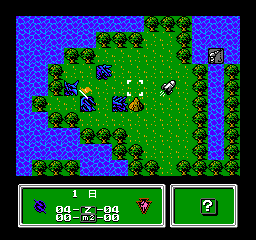
In Zoids Mokushiroku, players engage in strategic battles using various Zoids, which are mechanical dinosaurs. The gameplay revolves around choosing different Zoids, each with its own strengths and weaknesses, and utilizing them in turn-based combat. Players must navigate through different stages, making tactical decisions to defeat opponents while managing resources and Zoid health.
Today, Zoids Mokushiroku is an interesting title for those looking to explore lesser-known gems of the NES library. It offers a blend of action and strategy that was somewhat unique for its time, particularly for fans of the Zoids series. While it may not have the same recognition as other NES classics, its niche appeal and mechanics can provide a refreshing experience for retro gaming enthusiasts looking for something different.
GAME INFO
- Platform
- Nintendo Entertainment System
- Genre
- Action
- Players
- 1
- Region
- Japan
How to play Zoids Mokushiroku online
Getting started with Zoids Mokushiroku involves selecting your Zoid and understanding its abilities. The game begins with a menu in Japanese, so familiarity with basic navigation might help. Players will need to choose their Zoid wisely based on the strengths required for upcoming battles.
The core gameplay loop consists of engaging in turn-based combat against opponents while managing your Zoid's health and resources. Players must strategize their attacks and defenses, as each Zoid has unique capabilities. Mastering these mechanics and understanding the strengths of various Zoids will enhance your chances of victory as you progress through the game.
CONTROLS
Controls
- Arrow Keys — D-Pad / Movement
- X — A button (jump / confirm)
- S — B button (run / attack / cancel)
- Enter — Start / Pause
- V — Select
Zoids Mokushiroku FAQ
Who developed Zoids Mokushiroku?
The developer of Zoids Mokushiroku is not widely documented, leaving some ambiguity around its creation.
Is there anything iconic or memorable about Zoids Mokushiroku?
The game is notable for being part of the Zoids franchise, which features mechanical creatures in combat, appealing to fans of the genre and series.
Does Zoids Mokushiroku have a multiplayer or co-op mode?
There is no known multiplayer or co-op mode in Zoids Mokushiroku, as the gameplay is primarily focused on single-player battles.
You may also like
All Nintendo Entertainment System games











GAME INFO
- Platform
- Nintendo Entertainment System
- Genre
- Action
- Players
- 1
- Region
- Japan
COMMENTS (0)
No comments yet. Be the first to share your thoughts.