The game loads when you press Play · press “Play Now” inside the game if it asks.
Volleyball (USA, Europe)
Volleyball
Volleyball: NES Sports
- Nintendo Entertainment System
- Sports
- 5· 0 votes
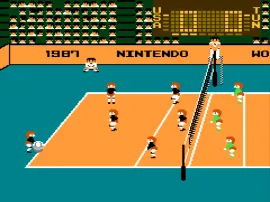
Volleyball (USA, Europe) is a sports game released for the Nintendo Entertainment System. It was developed and published by Nintendo, arriving in the late 1980s to early 1990s. As a classic sports title, it offers players the chance to engage in volleyball matches, reflecting the competitive spirit of the era's sports games.
In the game, players take control of a volleyball team, competing against an AI opponent or another player. The gameplay focuses on serving, passing, and spiking the ball to score points. Matches are played in a standard volleyball format, where players must utilize timing and strategy to outmaneuver their opponents and win sets.
This title is worth a look for those interested in retro sports games, though it may not be as polished as some of its contemporaries. Its simplicity and adherence to arcade-style gameplay make it a nostalgic experience for fans of the genre. While it might not have the depth of modern sports simulations, it captures the essence of volleyball and remains a fun diversion for both casual and dedicated gamers alike.
GAME INFO
- Platform
- Nintendo Entertainment System
- Genre
- Sports
- Publisher
- Nintendo
- Developer
- Nintendo Research & Development 1
- Released
- 1986
- Players
- 1-2
- Region
- USA, Europe
How to play Volleyball online
Getting started in Volleyball involves selecting your team and opponent before diving into a match. The core loop consists of serving the ball, attempting to score points through strategic plays, and defending against your opponent's attacks. New players should focus on mastering the timing of their serves and spikes, as well as positioning to receive the ball effectively.
As you play, you'll quickly learn the importance of teamwork and coordination if you're playing with another person. Practice makes perfect, and understanding the basic mechanics will help you improve your game. Remember that volleyball is about rhythm and strategy, so take your time to learn the nuances of each match.
CONTROLS
Controls
- Arrow Keys — D-Pad / Movement
- X — A button (jump / confirm)
- S — B button (run / attack / cancel)
- Enter — Start / Pause
- V — Select
Volleyball FAQ
Who developed Volleyball?
The game was developed by Nintendo, a well-known name in the gaming industry responsible for many classic titles.
Is Volleyball exclusive to Nintendo Entertainment System or did it appear on other systems?
Volleyball was primarily released for the Nintendo Entertainment System and does not have widely documented ports to other systems.
Is there anything iconic or memorable about Volleyball?
The game captures the essence of arcade-style sports gameplay, making it memorable for fans of retro sports titles, though it may lack the depth of modern games.
You may also like
All Nintendo Entertainment System games











GAME INFO
- Platform
- Nintendo Entertainment System
- Genre
- Sports
- Publisher
- Nintendo
- Developer
- Nintendo Research & Development 1
- Released
- 1986
- Players
- 1-2
- Region
- USA, Europe
COMMENTS (0)
No comments yet. Be the first to share your thoughts.