The game loads when you press Play · press “Play Now” inside the game if it asks.
Ultraman Club 3 (Japan)
Ultraman Club 3
About Ultraman Club 3
- Nintendo Entertainment System
- Action
- 5· 0 votes
Ultraman Club 3 is a Japan-exclusive game released for the Nintendo Entertainment System. It falls under the action genre and was developed in the early 1990s. This title is part of the Ultraman franchise, which has a rich history in Japanese media, but detailed developer information isn't widely documented.
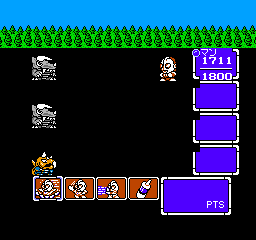
In Ultraman Club 3, players engage in various mini-games featuring characters from the Ultraman series. The gameplay often revolves around completing challenges that test reflexes and timing, with a focus on simple mechanics typical of the era. Players may also encounter different modes that allow for competitive play against friends or AI, which adds to the game's replay value.
This title is worth a look for fans of the Ultraman series or those interested in the variety of mini-games that the NES library has to offer. While it may not have the same recognition as other big-name titles, it captures a slice of Japanese gaming culture and is a fun diversion for players seeking something different. Its simplicity and charm can be appealing, especially for those who enjoy retro gaming and want to experience the lesser-known gems of the NES catalog.
GAME INFO
- Platform
- Nintendo Entertainment System
- Genre
- Action
- Players
- 1-2
- Region
- Japan
How to play Ultraman Club 3 online
Getting started in Ultraman Club 3 involves selecting a mini-game from the main menu, which is presented in Japanese. New players should familiarize themselves with the controls as they navigate through the options. Once a game is selected, players typically need to complete a specific task or challenge to progress.
The core loop of Ultraman Club 3 revolves around completing these mini-games, which may vary in objectives and mechanics. It’s important to practice timing and reflexes, as many challenges require quick responses. Keep in mind that since this is a Japanese title, some menu navigation may be tricky for non-Japanese speakers, but the gameplay mechanics are generally intuitive.
CONTROLS
Controls
- Arrow Keys — D-Pad / Movement
- X — A button (jump / confirm)
- S — B button (run / attack / cancel)
- Enter — Start / Pause
- V — Select
Ultraman Club 3 FAQ
Who developed Ultraman Club 3?
The specific developer for Ultraman Club 3 is not widely documented, but it is associated with the broader Ultraman franchise.
What makes Ultraman Club 3 stand out among Nintendo Entertainment System titles of its era?
Ultraman Club 3 offers a unique collection of mini-games that reflect the Ultraman series, making it a distinctive experience compared to more traditional titles of its time.
Does Ultraman Club 3 have a multiplayer or co-op mode?
Yes, the game includes options for multiplayer, allowing players to compete against each other in various mini-games, adding a fun social element to the experience.
You may also like
All Nintendo Entertainment System games











GAME INFO
- Platform
- Nintendo Entertainment System
- Genre
- Action
- Players
- 1-2
- Region
- Japan
COMMENTS (0)
No comments yet. Be the first to share your thoughts.