CHOOSE A VERSION
2 versions · same consoleChoose an original release, regional version, revision, bootleg or clearly labelled ROM hack/mod, then press Play. Hacks may change the gameplay. Switching versions restarts the player.
Selected: Default · Japan · Japan
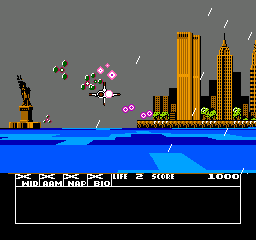
The game loads when you press Play · press “Play Now” inside the game if it asks.
Tetrastar - The Fighter (Japan)
Tetrastar - The Fighter
Getting to Know Tetrastar - The Fighter
- Nintendo Entertainment System
- Fighting
- 5· 0 votes
Tetrastar - The Fighter is a Japanese exclusive title released for the Nintendo Entertainment System. This game falls into the fighting genre, which was quite popular during the NES era. Information about the developer and publisher is not widely documented, making it a lesser-known entry in the NES library.
In Tetrastar - The Fighter, players engage in one-on-one battles against various opponents. The mechanics revolve around traditional fighting gameplay, where players must utilize a combination of attacks and defensive moves to defeat their rivals. While specific characters and story elements are not well-documented, the gameplay aligns with the genre's conventions of skillful maneuvering and timing.
This title is worth exploring for enthusiasts of retro fighting games, particularly those interested in Japanese exclusives. While it may not hold the same fame as titles like Street Fighter or Mortal Kombat, it offers a glimpse into the diversity of fighting games during the NES era. Its niche appeal and unique setting provide an interesting experience for collectors and fans of the genre alike.
GAME INFO
- Platform
- Nintendo Entertainment System
- Genre
- Fighting
- Players
- 1-2
- Region
- Japan
How to play Tetrastar - The Fighter online
To start playing Tetrastar - The Fighter, select your character from the main menu, which is presented in Japanese. Be prepared to navigate through the options, as understanding the menus may require some familiarity with the language. Once you’ve chosen your character, you’ll enter the fighting arena where you can start battling against the AI or another player.
The core gameplay loop involves engaging in combat with opponents, using various attacks and combos to deplete their health. Timing and positioning are crucial, as dodging and countering your opponent's moves can turn the tide of battle. As a fighting game, mastering your character's moves and learning the opponent's patterns will help you improve your skills over time.
CONTROLS
Controls
- Arrow Keys — D-Pad / Movement
- X — A button (jump / confirm)
- S — B button (run / attack / cancel)
- Enter — Start / Pause
- V — Select
Tetrastar - The Fighter FAQ
Can players save progress in Tetrastar - The Fighter?
No, Tetrastar - The Fighter does not have a save feature. Players will need to complete the game in one sitting.
In what year was Tetrastar - The Fighter originally released?
The exact release year for Tetrastar - The Fighter is not widely documented, making it difficult to confirm.
Is Tetrastar - The Fighter exclusive to Nintendo Entertainment System or did it appear on other systems?
Tetrastar - The Fighter is exclusive to the Nintendo Entertainment System and did not appear on other systems.
You may also like
All Nintendo Entertainment System games











GAME INFO
- Platform
- Nintendo Entertainment System
- Genre
- Fighting
- Players
- 1-2
- Region
- Japan
COMMENTS (0)
No comments yet. Be the first to share your thoughts.