CHOOSE A VERSION
2 versions · same consoleChoose an original release, regional version, revision, bootleg or clearly labelled ROM hack/mod, then press Play. Hacks may change the gameplay. Switching versions restarts the player.
Selected: Default · Japan · Japan
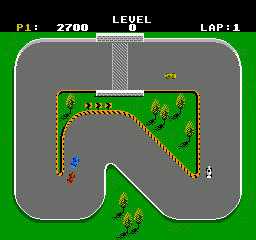
The game loads when you press Play · press “Play Now” inside the game if it asks.
Super Sprint (Japan)
Super Sprint
About Super Sprint
- Nintendo Entertainment System
- Racing
- 5· 0 votes
Super Sprint (Japan) is an arcade-style racing game that made its debut on the Nintendo Entertainment System during the late 1980s. Developed by an unknown team, this title is part of a genre that focuses on top-down racing mechanics. While the game has not gained as much notoriety as some of its contemporaries, it offers a unique take on the racing genre that fans of retro gaming may appreciate.
In Super Sprint, players control miniature cars from a top-down perspective, racing on various tracks filled with obstacles and power-ups. The core gameplay loop involves navigating tight corners and avoiding hazards while competing against opponents. Players can collect items that enhance their vehicles, adding a layer of strategy as they choose when to use these boosts to gain an advantage over rivals.
What makes Super Sprint worth trying today is its nostalgic charm and straightforward gameplay mechanics. Although it may not have the depth of more advanced racing titles, it captures the essence of arcade racing from its era. For those looking to explore the vast library of NES games, Super Sprint offers a delightful, if simple, racing experience that can evoke fond memories of arcade cabinets and local multiplayer fun.
GAME INFO
- Platform
- Nintendo Entertainment System
- Genre
- Racing
- Publisher
- Atari Games
- Developer
- Atari Games
- Released
- 1986
- Players
- 1-2
- Region
- Japan
How to play Super Sprint online
Getting Started: To begin playing Super Sprint, start the game from the main menu. You will need to choose your desired track and car before racing starts. Keep in mind that the menus are in Japanese, so you may need to navigate through the options carefully.
The primary objective is to complete each race by finishing ahead of your opponents. The game includes various power-ups that can help you gain speed or hinder your rivals. As you race, remember to manage your car's handling on the tight corners and utilize the power-ups wisely to maximize your chances of winning.
CONTROLS
Controls
- Arrow Keys — D-Pad / Movement
- X — A button (jump / confirm)
- S — B button (run / attack / cancel)
- Enter — Start / Pause
- V — Select
Super Sprint FAQ
Who developed Super Sprint?
The developer of Super Sprint is not widely documented, and specific details about the team behind the game remain unclear.
Is Super Sprint an official release, a fan hack, a prototype, or another kind of build?
This title is an official release for the Nintendo Entertainment System, known for its arcade-style racing gameplay.
Does Super Sprint have a multiplayer or co-op mode?
Super Sprint supports multiplayer racing, allowing players to compete against each other in a fun and competitive environment.
You may also like
All Nintendo Entertainment System games











GAME INFO
- Platform
- Nintendo Entertainment System
- Genre
- Racing
- Publisher
- Atari Games
- Developer
- Atari Games
- Released
- 1986
- Players
- 1-2
- Region
- Japan
COMMENTS (0)
No comments yet. Be the first to share your thoughts.