The game loads when you press Play · press “Play Now” inside the game if it asks.
Super Glove Ball (USA)
Super Glove Ball
Getting to Know Super Glove Ball
- Nintendo Entertainment System
- Action
- 5· 0 votes
Super Glove Ball is a unique action game for the Nintendo Entertainment System, released in the early 1990s. Developed by a lesser-known studio, it utilizes the NES Zapper and is part of a niche genre that incorporates elements of sports and platforming. The game presents a quirky twist on traditional gameplay, making it a curious entry in the NES library.
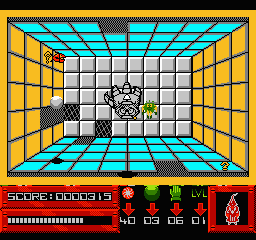
In Super Glove Ball, players control a character who interacts with the environment using a virtual glove. The main objective is to throw balls to complete various challenges and progress through levels. The mechanics revolve around precision and timing, as players must navigate through different stages while overcoming obstacles and enemies using their glove to catch and throw.
What makes Super Glove Ball worth exploring today is its distinctive approach to gameplay, which sets it apart from more conventional titles of its time. While it may not have the same level of recognition as other NES classics, it offers a fun and lighthearted experience that can be appreciated by those looking for something different. Its quirky mechanics and unique premise make it an interesting addition to any retro gaming collection, especially for fans of offbeat titles.
GAME INFO
- Platform
- Nintendo Entertainment System
- Genre
- Action
- Publisher
- Mattel
- Developer
- Rare Ltd.
- Released
- 1990
- Players
- 1
- Region
- USA
How to play Super Glove Ball online
To get started in Super Glove Ball, first, familiarize yourself with the controls outlined above. Begin by selecting your game mode and starting a new game. The core loop involves throwing and catching balls while navigating through various levels filled with obstacles and challenges.
As you play, focus on timing your throws and catches to overcome enemies and obstacles. Each level presents unique challenges, so adaptability is key. Take your time to learn the mechanics and enjoy the quirky, fun atmosphere that Super Glove Ball offers.
CONTROLS
Controls
- Arrow Keys — D-Pad / Movement
- X — A button (jump / confirm)
- S — B button (run / attack / cancel)
- Enter — Start / Pause
- V — Select
Super Glove Ball FAQ
Does Super Glove Ball have a multiplayer or co-op mode?
There is no multiplayer or co-op mode available in Super Glove Ball. The game is designed as a single-player experience, focusing on individual challenges and gameplay.
Can players save progress in Super Glove Ball?
The game does not feature a save system, so players must complete their progress in one sitting. This aspect reflects the era's design conventions, where many NES titles did not include save features.
Who developed Super Glove Ball?
The specific developer of Super Glove Ball is not widely documented. It is known to be a lesser-known title within the NES library, and details about its development team are scarce.
You may also like
All Nintendo Entertainment System games











GAME INFO
- Platform
- Nintendo Entertainment System
- Genre
- Action
- Publisher
- Mattel
- Developer
- Rare Ltd.
- Released
- 1990
- Players
- 1
- Region
- USA
COMMENTS (0)
No comments yet. Be the first to share your thoughts.