The game loads when you press Play · press “Play Now” inside the game if it asks.
Super Arabian (Japan)
Super Arabian
Getting to Know Super Arabian
- Nintendo Entertainment System
- Platformer
- 5· 0 votes
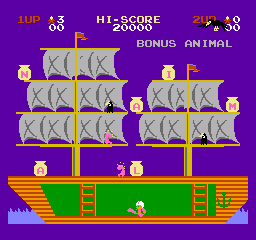
Super Arabian is a platform game developed for the Nintendo Entertainment System, originally released in Japan. This title is known for its engaging mechanics and colorful graphics, typical of the platforming genre during the late 80s and early 90s. While specific details about the developer remain scarce, the game has gained a niche following among retro enthusiasts due to its unique gameplay elements.
In Super Arabian, players navigate through various levels, controlling a character that must overcome enemies and obstacles. The gameplay is structured around jumping, running, and attacking, with an emphasis on timing and precision. As players progress, they encounter different challenges that require quick reflexes and strategic thinking to clear each level successfully.
Today, Super Arabian is worth trying for those interested in classic NES titles or platformers of its era. While it may not be as widely recognized as other iconic games, it offers a nostalgic experience that captures the charm of early video games. Fans of the genre will appreciate its simple yet challenging gameplay, making it a fun addition to any retro gaming library.
GAME INFO
- Platform
- Nintendo Entertainment System
- Genre
- Platformer
- Players
- 1
- Region
- Japan
How to play Super Arabian online
To get started in Super Arabian, choose your preferred game mode and familiarize yourself with the controls. The core loop involves navigating through levels, defeating enemies, and collecting items to enhance your abilities. Focus on mastering the timing of your jumps and attacks, as this will help you progress through the increasingly challenging stages.
As you play, keep an eye out for power-ups and bonuses that can aid you in your quest. Since this game is originally in Japanese, be prepared for menus and prompts in that language. However, the gameplay mechanics are intuitive enough that you can enjoy the experience even without understanding the text fully.
CONTROLS
Controls
- Arrow Keys — D-Pad / Movement
- X — A button (jump / confirm)
- S — B button (run / attack / cancel)
- Enter — Start / Pause
- V — Select
Super Arabian FAQ
Who developed Super Arabian?
The developer of Super Arabian is not widely documented, which makes it difficult to pinpoint specific details about the team behind the game.
Is Super Arabian considered easy to pick up or challenging?
The game offers a mix of both; while the controls are straightforward, the challenges can become quite demanding as you progress through the levels.
Is Super Arabian exclusive to Nintendo Entertainment System or did it appear on other systems?
Super Arabian is primarily known for its release on the Nintendo Entertainment System and does not have widely recognized versions on other systems.
You may also like
All Nintendo Entertainment System games











GAME INFO
- Platform
- Nintendo Entertainment System
- Genre
- Platformer
- Players
- 1
- Region
- Japan
COMMENTS (0)
No comments yet. Be the first to share your thoughts.