CHOOSE A VERSION
2 versions · same consoleChoose an original release, regional version, revision, bootleg or clearly labelled ROM hack/mod, then press Play. Hacks may change the gameplay. Switching versions restarts the player.
Selected: Default · USA · USA
The game loads when you press Play · press “Play Now” inside the game if it asks.
Sqoon (USA)
Sqoon
Sqoon: NES Action
- Nintendo Entertainment System
- Action
- 5· 0 votes
Sqoon is an action game released for the Nintendo Entertainment System (NES) in the USA. Developed by D. S. M. and published by the now-defunct company, it offers a unique gameplay experience that combines elements of shooting and strategic movement. The game is not a hack or a mod but stands on its own as an official release in the NES library.
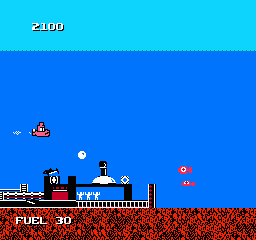
In Sqoon, players control a submarine navigating through underwater environments while battling various sea creatures. The primary objective involves destroying enemy vessels and collecting power-ups that enhance the submarine's capabilities. Players must maneuver carefully to avoid obstacles and manage their resources, leading to a gameplay loop that emphasizes both skill and strategy.
This title has a niche appeal, particularly for fans of retro games who appreciate the unique blend of action and strategic elements. While it may not be as widely recognized as other NES classics, it holds a place in the hearts of those who enjoy lesser-known titles. Its gameplay mechanics provide a different experience compared to more mainstream shooters, making it worth a try for collectors and enthusiasts looking for something off the beaten path.
GAME INFO
- Platform
- Nintendo Entertainment System
- Genre
- Action
- Publisher
- Irem
- Developer
- Magical Company
- Released
- 1986
- Players
- 1
- Region
- USA
How to play Sqoon online
To get started in Sqoon, first, familiarize yourself with the controls listed above. Upon launching the game, you’ll find yourself in control of a submarine ready to take on various underwater foes. The core loop involves navigating through levels while engaging enemies and collecting power-ups to upgrade your submarine.
As you progress, focus on managing your health and ammunition effectively. The levels can be challenging, so learning enemy patterns and using your resources wisely will be key to survival. Keep an eye out for power-ups, as they are crucial for enhancing your submarine's performance and will help you tackle tougher challenges ahead.
CONTROLS
Controls
- Arrow Keys — D-Pad / Movement
- X — A button (jump / confirm)
- S — B button (run / attack / cancel)
- Enter — Start / Pause
- V — Select
Sqoon FAQ
Who developed Sqoon?
The game was developed by D. S. M., a lesser-known studio that contributed to the NES library.
In what year was Sqoon originally released?
Sqoon was released for the NES in the USA, but the exact year of release is not widely documented.
Roughly how long does it take to finish Sqoon?
Completing Sqoon can take several hours, depending on the player's skill level and familiarity with the gameplay mechanics.
You may also like
All Nintendo Entertainment System games











GAME INFO
- Platform
- Nintendo Entertainment System
- Genre
- Action
- Publisher
- Irem
- Developer
- Magical Company
- Released
- 1986
- Players
- 1
- Region
- USA
COMMENTS (0)
No comments yet. Be the first to share your thoughts.