The game loads when you press Play · press “Play Now” inside the game if it asks.
Solstice (Japan)
Solstice
Solstice on NES
- Nintendo Entertainment System
- Puzzle
- 5· 0 votes
Solstice (Japan) is a puzzle-platformer game released for the Nintendo Entertainment System. Developed by the British company, Ultimate Play the Game, it was later published in Japan by the company Kōsen. The game is known for its isometric perspective and intricate level design, typical of the platforming genre during the late 1980s and early 1990s.
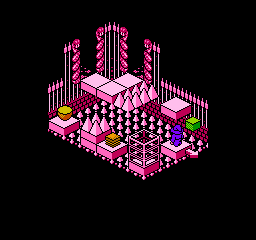
In Solstice, players navigate through a series of challenging levels filled with puzzles and enemies. The gameplay revolves around solving various environmental puzzles, using items collected throughout the game to progress. The isometric viewpoint can make navigation tricky, but it adds a unique layer of depth to the gameplay, requiring players to think critically about their moves and strategy.
This title is noteworthy for its challenging gameplay and unique isometric perspective, which was less common on the NES compared to side-scrolling platformers. While it may not have achieved the same level of fame as other titles of its era, Solstice offers a distinctive experience that can be appreciated by fans of puzzle games. Its complexity and engaging mechanics make it a gem for retro gaming enthusiasts looking for something a bit different from the mainstream offerings of the time.
GAME INFO
- Platform
- Nintendo Entertainment System
- Genre
- Puzzle
- Publisher
- Sony Imagesoft
- Developer
- Software Creations
- Released
- 1990
- Players
- 1
- Region
- Japan
How to play Solstice online
Getting started in Solstice can be a bit daunting, especially since the menus are entirely in Japanese. After starting the game, you'll find yourself in a maze-like environment where you need to explore and collect items. Pay attention to your surroundings, as many puzzles require using specific items in designated areas.
The core loop involves solving puzzles to unlock new areas while avoiding enemies that can hinder your progress. Each level presents different challenges, so take your time to think through your actions. Experiment with different items and mechanics, as this will be essential to advancing through the game.
CONTROLS
Controls
- Arrow Keys — D-Pad / Movement
- X — A button (jump / confirm)
- S — B button (run / attack / cancel)
- Enter — Start / Pause
- V — Select
Solstice FAQ
What makes Solstice stand out among Nintendo Entertainment System titles of its era?
The game features a unique isometric perspective, which was relatively rare for NES platformers. Its intricate level design and challenging puzzles set it apart from more straightforward side-scrolling titles.
In what year was Solstice originally released?
The exact release year of Solstice is not widely documented, but it was released during the late 1980s, a period known for innovative titles on the NES.
Does Solstice have a multiplayer or co-op mode?
Solstice is a single-player experience, focusing on solo puzzle-solving and exploration rather than cooperative gameplay.
You may also like
All Nintendo Entertainment System games











GAME INFO
- Platform
- Nintendo Entertainment System
- Genre
- Puzzle
- Publisher
- Sony Imagesoft
- Developer
- Software Creations
- Released
- 1990
- Players
- 1
- Region
- Japan
COMMENTS (0)
No comments yet. Be the first to share your thoughts.