CHOOSE A VERSION
2 versions · same consoleChoose an original release, regional version, revision, bootleg or clearly labelled ROM hack/mod, then press Play. Hacks may change the gameplay. Switching versions restarts the player.
Selected: Default · USA · USA
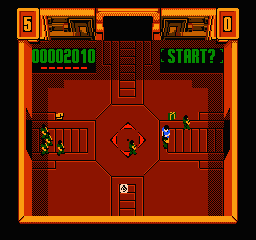
The game loads when you press Play · press “Play Now” inside the game if it asks.
Smash T.V. (USA)
Smash T.V.
What is Smash T.V.?
- Nintendo Entertainment System
- Run and Gun
- 5· 0 votes
GAME INFO
- Platform
- Nintendo Entertainment System
- Genre
- Run and Gun
- Publisher
- WMS Industries
- Developer
- WMS Industries
- Released
- 1990
- Players
- 1-2
- Region
- USA
How to play Smash T.V. online
CONTROLS
Controls
- Arrow Keys — D-Pad / Movement
- X — A button (jump / confirm)
- S — B button (run / attack / cancel)
- Enter — Start / Pause
- V — Select
Smash T.V. FAQ
What type of game is Smash T.V.?
This is a run and gun arcade game that combines shooting mechanics with a unique game show theme. Players battle through various levels filled with enemies and obstacles.
Is there anything iconic or memorable about Smash T.V.?
The game is known for its over-the-top violence and satirical commentary on television game shows. Its frantic gameplay and cooperative mode make it a memorable experience for players.
Is Smash T.V. considered easy to pick up or challenging?
While the controls are simple, the game can be quite challenging due to the sheer number of enemies and the fast-paced action. New players may find it difficult at first but can quickly learn to navigate the chaos.
You may also like
All Nintendo Entertainment System games











GAME INFO
- Platform
- Nintendo Entertainment System
- Genre
- Run and Gun
- Publisher
- WMS Industries
- Developer
- WMS Industries
- Released
- 1990
- Players
- 1-2
- Region
- USA
COMMENTS (0)
No comments yet. Be the first to share your thoughts.