The game loads when you press Play · press “Play Now” inside the game if it asks.
Sesame Street ABC & 123 (USA)
Sesame Street ABC & 123
Sesame Street ABC & 123 Overview
- Nintendo Entertainment System
- Educational
- 5· 0 votes
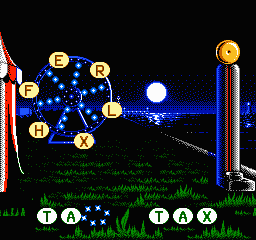
Sesame Street ABC & 123 is an educational game released for the Nintendo Entertainment System (NES) in the early 1990s. Developed to engage young children, this title features beloved characters from the iconic Sesame Street television series. The game focuses on teaching basic literacy and numeracy skills, making it a notable entry in the educational genre for the NES platform.
In the game, players interact with various mini-games that revolve around letters and numbers. The gameplay is designed to be simple and accessible, allowing children to explore different activities at their own pace. Players may engage with puzzles, matching games, and other activities that reinforce learning while being entertaining. This hands-on approach aids in developing foundational skills necessary for early education.
What makes Sesame Street ABC & 123 worth trying today is its nostalgic value and educational focus. While it may not compete with more action-oriented titles from the NES library, its charm lies in its ability to entertain and educate young players. For parents looking to introduce their children to gaming, this title serves as a gentle introduction, representing a time when educational games were becoming more mainstream in the home gaming market.
GAME INFO
- Platform
- Nintendo Entertainment System
- Genre
- Educational
- Publisher
- Hi Tech Expressions
- Developer
- Rare Ltd.
- Released
- 1991
- Players
- 1
- Region
- USA
How to play Sesame Street ABC & 123 online
Getting started with Sesame Street ABC & 123 is straightforward. Upon launching the game, players are typically greeted with a menu where they can choose different activities. The core loop revolves around selecting mini-games that focus on letters and numbers, allowing children to engage in learning while having fun.
As you play, you can expect to encounter a variety of educational tasks. Each mini-game is designed to be simple enough for young players to grasp quickly. Familiarity with the controls will enhance the experience, making it easier to navigate through the different challenges presented in the game.
CONTROLS
Controls
- Arrow Keys — D-Pad / Movement
- X — A button (jump / confirm)
- S — B button (run / attack / cancel)
- Enter — Start / Pause
- V — Select
Sesame Street ABC & 123 FAQ
What makes Sesame Street ABC & 123 stand out among Nintendo Entertainment System titles of its era?
The game is particularly notable for its educational content tailored for young children, which was less common in the NES library. Its engaging characters and interactive mini-games provide a unique blend of fun and learning.
Is Sesame Street ABC & 123 exclusive to Nintendo Entertainment System or did it appear on other systems?
This title is primarily known for its release on the Nintendo Entertainment System. There are no widely documented releases on other platforms, which makes it a unique entry in the NES lineup.
Does Sesame Street ABC & 123 have a multiplayer or co-op mode?
The game does not feature a multiplayer or co-op mode. It is designed as a single-player experience, focusing on individual learning and engagement through its various mini-games.
You may also like
All Nintendo Entertainment System games











GAME INFO
- Platform
- Nintendo Entertainment System
- Genre
- Educational
- Publisher
- Hi Tech Expressions
- Developer
- Rare Ltd.
- Released
- 1991
- Players
- 1
- Region
- USA
COMMENTS (0)
No comments yet. Be the first to share your thoughts.