The game loads when you press Play · press “Play Now” inside the game if it asks.
Power Punch II (USA)
Power Punch II
Power Punch II - Fighting Classic
- Nintendo Entertainment System
- Fighting
- 5· 0 votes
Power Punch II is a fighting game released for the Nintendo Entertainment System in the early 1990s. Developed by a team known as the 'Power Punch' group, this title falls within the genre of action games. It is important to note that this game is considered a lesser-known title and does not have a widespread reputation compared to other NES classics.
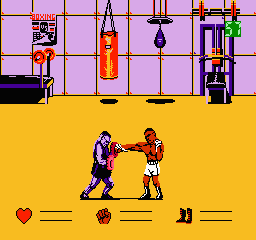
In Power Punch II, players take on the role of a boxer, engaging in one-on-one matches against various opponents. The gameplay revolves around timing and strategy, as players must dodge, punch, and counterattack to defeat their rivals. The mechanics are straightforward, featuring basic controls that allow players to execute attacks and movements, making it accessible for newcomers to the genre.
For those exploring the NES library, Power Punch II offers a unique experience that reflects the fighting game conventions of its time. While it may not be as polished or engaging as more popular titles, it still provides a nostalgic glimpse into the era's game design. Fans of retro games or those interested in niche fighting titles will likely find value in trying it out, even if it doesn't match the excitement of more renowned entries in the genre.
GAME INFO
- Platform
- Nintendo Entertainment System
- Genre
- Fighting
- Developer
- Krome Studios Melbourne
- Released
- 1992
- Players
- 1
- Region
- USA
How to play Power Punch II online
Getting started in Power Punch II involves selecting your boxer and entering the ring for your first match. In this game, you will face a series of opponents, each with their own unique fighting styles and patterns. The core loop consists of learning these patterns, timing your attacks, and utilizing defensive moves to secure victory.
As you progress, pay attention to the mechanics of dodging and countering, which are crucial for success. Mastering the controls and understanding your opponent's moves will enhance your gameplay experience. While the game may not have extensive tutorials or explanations, practicing these strategies will help you become a formidable fighter.
CONTROLS
Controls
- Arrow Keys — D-Pad / Movement
- X — A button (jump / confirm)
- S — B button (run / attack / cancel)
- Enter — Start / Pause
- V — Select
Power Punch II FAQ
Who developed Power Punch II?
The developer of Power Punch II is not widely documented, but it is known to be associated with a group referred to as the 'Power Punch' team.
Is Power Punch II exclusive to Nintendo Entertainment System or did it appear on other systems?
Power Punch II is primarily known as an NES title and does not have confirmed releases on other systems.
Roughly how long does it take to finish Power Punch II?
The time to finish Power Punch II can vary, but players can expect to complete it in a few hours, depending on their skill level and familiarity with fighting games.
You may also like
All Nintendo Entertainment System games











GAME INFO
- Platform
- Nintendo Entertainment System
- Genre
- Fighting
- Developer
- Krome Studios Melbourne
- Released
- 1992
- Players
- 1
- Region
- USA
COMMENTS (0)
No comments yet. Be the first to share your thoughts.