The game loads when you press Play · press “Play Now” inside the game if it asks.
Pizza Pop! (Japan)
Pizza Pop!
Inside Pizza Pop!
- Nintendo Entertainment System
- Puzzle
- 5· 0 votes
Pizza Pop! is a lesser-known game released exclusively in Japan for the Nintendo Entertainment System. It falls into the puzzle genre, blending elements of action and strategy. The game was developed during the late 1980s, a period rich with innovative titles on the NES platform, but specific details about its development team remain elusive.
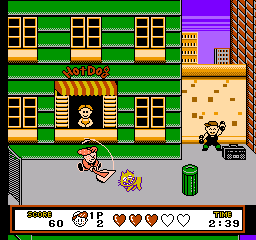
In Pizza Pop!, players engage in a unique gameplay loop that involves managing pizza production and serving customers. You’ll navigate through various levels, solving puzzles and challenges that test your reflexes and strategic thinking. The mechanics revolve around efficiently preparing pizzas while dealing with obstacles and time constraints, keeping the gameplay engaging and fast-paced.
Despite its niche appeal, Pizza Pop! offers a delightful experience for fans of retro puzzle games. It’s not as widely recognized as some of its contemporaries, but it provides a charming glimpse into the creativity of the NES era. If you enjoy games that challenge your problem-solving skills in a lighthearted context, this title might be worth a try, especially for collectors and enthusiasts of obscure NES games.
GAME INFO
- Platform
- Nintendo Entertainment System
- Genre
- Puzzle
- Publisher
- Jaleco
- Developer
- Arc System Works
- Released
- 1992
- Players
- 1
- Region
- Japan
How to play Pizza Pop! online
Getting started with Pizza Pop! involves selecting the game from the main menu, which is in Japanese. Familiarize yourself with the controls before diving in, as quick reflexes are key to mastering the game. The core loop revolves around preparing pizzas and serving them to customers, so be ready to think on your feet.
As you progress, you'll encounter various challenges that require both speed and strategy. Pay attention to customer orders and try to fulfill them promptly to score points. While the game may present language barriers for non-Japanese speakers, the mechanics are intuitive enough that players can quickly adapt and enjoy the gameplay.
CONTROLS
Controls
- Arrow Keys — D-Pad / Movement
- X — A button (jump / confirm)
- S — B button (run / attack / cancel)
- Enter — Start / Pause
- V — Select
Pizza Pop! FAQ
Who developed Pizza Pop!?
Information about the development team behind Pizza Pop! is not widely documented.
Which regions was Pizza Pop! released in?
Pizza Pop! was released exclusively in Japan for the Nintendo Entertainment System.
Does Pizza Pop! have a multiplayer or co-op mode?
The game does not feature a multiplayer or co-op mode; it is designed for a single-player experience.
You may also like
All Nintendo Entertainment System games











GAME INFO
- Platform
- Nintendo Entertainment System
- Genre
- Puzzle
- Publisher
- Jaleco
- Developer
- Arc System Works
- Released
- 1992
- Players
- 1
- Region
- Japan
COMMENTS (0)
No comments yet. Be the first to share your thoughts.