The game loads when you press Play · press “Play Now” inside the game if it asks.
Pachi Com (Japan)
Pachi Com
Inside Pachi Com
- Nintendo Entertainment System
- Action
- 5· 0 votes
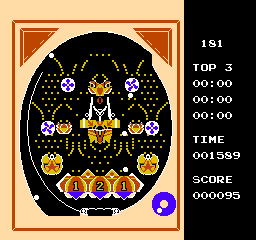
Pachi Com is a title released exclusively in Japan for the Nintendo Entertainment System. This game falls into the action genre and is known for its unique mechanics that blend elements of gambling with traditional gameplay. While much about its development is not widely documented, it represents an interesting niche within the NES library.
In Pachi Com, players engage with a pachinko-style mechanic, where the objective revolves around earning points through a series of skill-based challenges. The gameplay involves managing the dropping of balls in a way that maximizes scoring potential, reminiscent of real-life pachinko machines. This combination of action and chance gives players a different experience compared to typical platformers or shooters from the era.
Today, Pachi Com is worth trying for those interested in the diverse offerings of the NES library. While it may not appeal to everyone due to its specific mechanics and niche theme, it provides a unique glimpse into the cultural impact of pachinko in Japan. For retro gaming enthusiasts, it’s a curiosity that showcases the creativity of game developers during the 8-bit era, making it a notable title for collectors and fans of the genre alike.
GAME INFO
- Platform
- Nintendo Entertainment System
- Genre
- Action
- Region
- Japan
How to play Pachi Com online
Getting started in Pachi Com involves navigating through the main menu, which is in Japanese. Players will want to familiarize themselves with the controls to effectively manage their gameplay. The core loop involves dropping balls into the machine and aiming to score as many points as possible, taking into consideration the physics of the game.
As players progress, they should focus on understanding the mechanics of ball placement and scoring opportunities. The game rewards skillful play, and while it may take some time to master the nuances, practicing will lead to better results. Remember, this title is a Japanese-only release, so players might want to use translation tools for any complex menu navigation.
CONTROLS
Controls
- Arrow Keys — D-Pad / Movement
- X — A button (jump / confirm)
- S — B button (run / attack / cancel)
- Enter — Start / Pause
- V — Select
Pachi Com FAQ
Which regions was Pachi Com released in?
Pachi Com was released exclusively in Japan, and there are no known international versions of the game.
Roughly how long does it take to finish Pachi Com?
The time to finish Pachi Com can vary significantly depending on player skill, but it generally takes about 1-2 hours to explore its mechanics and achieve a decent score.
Who developed Pachi Com?
The development details for Pachi Com are not widely documented, and specific information about the developer remains unclear.
You may also like
All Nintendo Entertainment System games











GAME INFO
- Platform
- Nintendo Entertainment System
- Genre
- Action
- Region
- Japan
COMMENTS (0)
No comments yet. Be the first to share your thoughts.