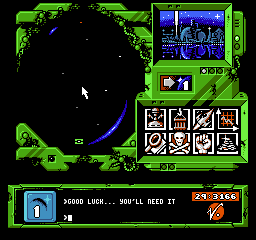
The game loads when you press Play · press “Play Now” inside the game if it asks.
Overlord (USA)
Overlord
Overlord Overview
- Nintendo Entertainment System
- Action
- 5· 0 votes
Overlord (USA) is a classic title for the Nintendo Entertainment System, originally released in 1990. This game falls within the action genre and was developed by a team known for creating engaging gameplay experiences. While not a mainstream hit, it has garnered a niche following among retro gaming enthusiasts who appreciate its unique mechanics and style.
In Overlord, players take on the role of a powerful character navigating through various levels filled with enemies and obstacles. The gameplay revolves around action-oriented mechanics where players can attack foes and utilize special abilities to progress through the game. The levels are designed to challenge players with a mix of platforming and combat, requiring skill and strategy to advance.
Today, Overlord is worth trying for those interested in exploring lesser-known titles from the NES library. While it may not have the widespread recognition of other classics, it offers a glimpse into the diverse range of games that emerged during the 8-bit era. Fans of action games from this period will find it a unique experience that highlights the creativity and experimentation characteristic of its time.
GAME INFO
- Platform
- Nintendo Entertainment System
- Genre
- Action
- Publisher
- Codemasters
- Developer
- Electronic Arts
- Released
- 1990
- Players
- 1
- Region
- USA
How to play Overlord online
Getting started in Overlord involves selecting your character and diving into the game's first level. Players should familiarize themselves with the controls and mechanics early on, as timing and precision are crucial for overcoming obstacles and defeating enemies. As you progress, collecting power-ups and understanding enemy patterns will enhance your gameplay experience.
The core loop revolves around navigating through levels, defeating enemies, and utilizing gained abilities to reach new areas. It's essential to practice your timing when jumping and attacking to succeed. Keep an eye out for hidden items that can aid in your journey, as exploration often rewards players with helpful upgrades.
CONTROLS
Controls
- Arrow Keys — D-Pad / Movement
- X — A button (jump / confirm)
- S — B button (run / attack / cancel)
- Enter — Start / Pause
- V — Select
Overlord FAQ
Is there anything iconic or memorable about Overlord?
Many players remember Overlord for its unique blend of action and platforming that was characteristic of NES games. Its gameplay mechanics and level design, while not groundbreaking, provide a nostalgic experience for fans of the era.
Is Overlord exclusive to Nintendo Entertainment System or did it appear on other systems?
Overlord was released exclusively for the Nintendo Entertainment System and did not see ports to other systems. This exclusivity has contributed to its status as a niche title among NES collectors.
Who developed Overlord?
The development details of Overlord are not widely documented, leaving some uncertainty about the specific team behind the game. However, it is recognized as part of the NES library from the early 1990s.
You may also like
All Nintendo Entertainment System games











GAME INFO
- Platform
- Nintendo Entertainment System
- Genre
- Action
- Publisher
- Codemasters
- Developer
- Electronic Arts
- Released
- 1990
- Players
- 1
- Region
- USA
COMMENTS (0)
No comments yet. Be the first to share your thoughts.