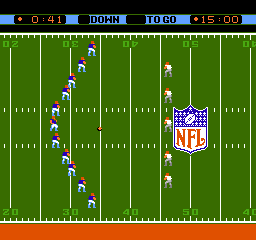
The game loads when you press Play · press “Play Now” inside the game if it asks.
NFL (USA)
NFL
Inside NFL
- Nintendo Entertainment System
- Sports
- 5· 0 votes
NFL (USA) is a sports video game for the Nintendo Entertainment System, released during the peak of the console's popularity in the late 1980s and early 1990s. This title was developed by the company known for its sports games, although specific developer details are not widely documented. As a classic sports game, it captures the excitement of American football, allowing players to experience the thrill of the NFL on their home console.
In NFL (USA), players engage in football matches, controlling their chosen teams to score points and outmaneuver their opponents. The gameplay revolves around executing plays, passing the ball, and tackling opponents to gain control. While the game may not have the depth of modern sports titles, it reflects the genre conventions of its time, emphasizing quick matches and straightforward mechanics that were accessible to players of all skill levels.
This game is worth exploring for those interested in retro sports titles or the history of football games on consoles. It holds a nostalgic place in the NES library, embodying the simple yet engaging gameplay typical of the era. While it may not be as sophisticated as later NFL games, its charm lies in its straightforward approach and the opportunity to experience a piece of gaming history.
GAME INFO
- Platform
- Nintendo Entertainment System
- Genre
- Sports
- Publisher
- LJN
- Developer
- Atlus
- Released
- 1989
- Players
- 1-2
- Region
- USA
How to play NFL online
Getting started with NFL (USA) involves selecting your team and choosing a game mode. You can jump right into a match or explore options to adjust settings. The core loop consists of playing through quarters, making strategic plays, and attempting to score touchdowns while defending against the opposing team.
As you play, remember to familiarize yourself with the controls for passing, running, and tackling. The gameplay is designed to be fast-paced, so quick decision-making is key. It's a straightforward experience, making it accessible for newcomers while still offering enough challenge for seasoned players.
CONTROLS
Controls
- Arrow Keys — D-Pad / Movement
- X — A button (jump / confirm)
- S — B button (run / attack / cancel)
- Enter — Start / Pause
- V — Select
NFL FAQ
Can players save progress in NFL?
Progress saving is not a feature in NFL (USA), typical for many NES titles of the era. Players must complete their games in one sitting.
Is NFL exclusive to Nintendo Entertainment System or did it appear on other systems?
NFL (USA) is primarily known as an NES title and did not receive official releases on other systems. It remains a classic for fans of the NES library.
What makes NFL stand out among Nintendo Entertainment System titles of its era?
The game stands out for its simplicity and nostalgic appeal, capturing the essence of American football during a time when sports games were evolving. It provides a quick and engaging experience reflective of the sports genre on the NES.
You may also like
All Nintendo Entertainment System games











GAME INFO
- Platform
- Nintendo Entertainment System
- Genre
- Sports
- Publisher
- LJN
- Developer
- Atlus
- Released
- 1989
- Players
- 1-2
- Region
- USA
COMMENTS (0)
No comments yet. Be the first to share your thoughts.