CHOOSE A VERSION
2 versions · same consoleChoose an original release, regional version, revision, bootleg or clearly labelled ROM hack/mod, then press Play. Hacks may change the gameplay. Switching versions restarts the player.
Selected: Default · USA · USA
The game loads when you press Play · press “Play Now” inside the game if it asks.
Laser Invasion (USA)
Laser Invasion
Laser Invasion on NES
- Nintendo Entertainment System
- Action
- 5· 0 votes
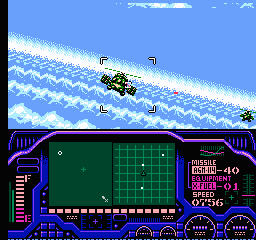
Laser Invasion (USA) is an action game released for the Nintendo Entertainment System. It is known for its unique gameplay mechanics and was developed by an undisclosed team. This title adds to the diverse library of NES games that emerged during the platform's peak in the late 1980s and early 1990s, offering players an engaging experience in the action genre.
In Laser Invasion, players engage in a top-down shooting experience where they navigate through various levels filled with enemies and obstacles. The gameplay typically involves shooting enemies while avoiding their attacks, utilizing power-ups that enhance gameplay. As players progress, they encounter increasingly challenging levels that require skillful maneuvering and quick reflexes to survive.
This title has a niche appeal within the NES library, as it may not be as widely recognized as other blockbuster titles of the era. However, it offers a satisfying experience for players who enjoy action games with straightforward mechanics. Laser Invasion holds a special place for collectors and enthusiasts, providing a glimpse into the experimental nature of early console gaming during its time.
GAME INFO
- Platform
- Nintendo Entertainment System
- Genre
- Action
- Publisher
- Konami
- Developer
- Konami
- Released
- 1991
- Region
- USA
How to play Laser Invasion online
To get started in Laser Invasion, first select your game mode from the main menu. The game usually begins with a tutorial or introductory level that helps you familiarize yourself with the controls and mechanics. It’s important to pay attention to the layout of each level, as they often contain hidden items and power-ups that can aid your progress.
As you play, engage with enemies by utilizing your shooting abilities while dodging their attacks. The core loop revolves around clearing levels, defeating bosses, and collecting power-ups to improve your character's abilities. Make sure to explore each area thoroughly, as the game rewards exploration with useful items that enhance your chances of success.
CONTROLS
Controls
- Arrow Keys — D-Pad / Movement
- X — A button (jump / confirm)
- S — B button (run / attack / cancel)
- Enter — Start / Pause
- V — Select
Laser Invasion FAQ
Who developed Laser Invasion?
The developer of Laser Invasion is not widely documented, leaving a gap in the game's historical context.
Is there anything iconic or memorable about Laser Invasion?
This game is noted for its unique top-down shooting mechanics, which were somewhat innovative for its time, though it may not have achieved iconic status.
In what year was Laser Invasion originally released?
The release year for Laser Invasion is not widely documented, making it difficult to provide a specific date.
You may also like
All Nintendo Entertainment System games











GAME INFO
- Platform
- Nintendo Entertainment System
- Genre
- Action
- Publisher
- Konami
- Developer
- Konami
- Released
- 1991
- Region
- USA
COMMENTS (0)
No comments yet. Be the first to share your thoughts.