CHOOSE A VERSION
3 versions · same consoleChoose an original release, regional version, revision, bootleg or clearly labelled ROM hack/mod, then press Play. Hacks may change the gameplay. Switching versions restarts the player.
Selected: Default · Japan · Japan
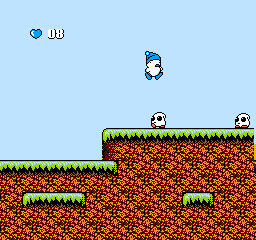
The game loads when you press Play · press “Play Now” inside the game if it asks.
Hebereke (Japan)
Hebereke
Hebereke - Platformer Classic
- Nintendo Entertainment System
- Platformer
- 5· 0 votes
GAME INFO
- Platform
- Nintendo Entertainment System
- Genre
- Platformer
- Publisher
- Sun Corporation
- Developer
- Sun Corporation
- Released
- 1991
- Players
- 1
- Region
- Japan
How to play Hebereke online
CONTROLS
Controls
- Arrow Keys — D-Pad / Movement
- X — A button (jump / confirm)
- S — B button (run / attack / cancel)
- Enter — Start / Pause
- V — Select
Hebereke FAQ
Is there anything iconic or memorable about Hebereke?
The game's colorful graphics and quirky character designs contribute to its charm, making it memorable among fans of retro gaming. Its unique gameplay mechanics, such as object throwing and puzzle-solving, also set it apart from other platformers of its time.
Is Hebereke exclusive to Nintendo Entertainment System or did it appear on other systems?
Hebereke was primarily released for the Nintendo Entertainment System and is known mainly within that context. While it has not seen official releases on other platforms, it remains a notable title in the NES library.
Who developed Hebereke?
Hebereke was developed by Sunsoft, a company recognized for creating several popular games during the 8-bit and 16-bit eras. Their work on Hebereke showcases their ability to blend engaging gameplay with distinctive art style.
You may also like
All Nintendo Entertainment System games











GAME INFO
- Platform
- Nintendo Entertainment System
- Genre
- Platformer
- Publisher
- Sun Corporation
- Developer
- Sun Corporation
- Released
- 1991
- Players
- 1
- Region
- Japan
COMMENTS (0)
No comments yet. Be the first to share your thoughts.