The game loads when you press Play · press “Play Now” inside the game if it asks.
Gomoku Narabe (Japan)
Gomoku Narabe
Gomoku Narabe - Board Game Classic
- Nintendo Entertainment System
- Board Game
- 5· 0 votes
Gomoku Narabe is a classic game released on the Nintendo Entertainment System, specifically in Japan. This title is part of the board game genre, which translates the traditional game of Gomoku into a digital format. While details about its exact release year and developer are not widely documented, it stands as an interesting representation of early video adaptations of popular games.
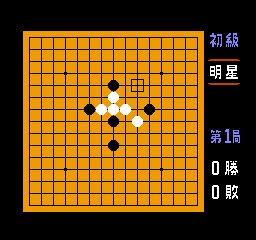
In Gomoku Narabe, players engage in a turn-based strategy where the objective is to align five of their pieces in a row on a grid. The gameplay is straightforward, as each player takes turns placing their markers on the board, aiming to outmaneuver their opponent. The simplicity of the mechanics allows for strategic depth, making each match a test of skill and foresight rather than quick reflexes.
Though it may not be as flashy as other NES titles, Gomoku Narabe offers a nostalgic experience that highlights the era's focus on strategic gameplay. It appeals to fans of board games and those interested in retro gaming culture. While it may seem niche compared to more popular titles, it serves as a reminder of the diversity of games available during the NES era, perfect for players who appreciate classic strategy games.
GAME INFO
- Platform
- Nintendo Entertainment System
- Genre
- Board Game
- Players
- 1-2
- Region
- Japan
How to play Gomoku Narabe online
Getting started in Gomoku Narabe involves selecting your game mode and opponent. Since this game is in Japanese, players may need to familiarize themselves with the menu options. Once you're in the game, the core loop revolves around placing your pieces on the grid, with the goal of connecting five in a row before your opponent does.
As you play, be mindful of your opponent's moves and try to block their attempts to create a row. Each turn offers a chance to strategize, so consider your placements carefully. The game may seem simple, but mastering it requires patience and practice, making it a rewarding experience for those who enjoy strategic thinking.
CONTROLS
Controls
- Arrow Keys — D-Pad / Movement
- X — A button (jump / confirm)
- S — B button (run / attack / cancel)
- Enter — Start / Pause
- V — Select
Gomoku Narabe FAQ
Is Gomoku Narabe considered easy to pick up or challenging?
The game is generally easy to pick up due to its straightforward mechanics. However, like many strategy games, mastering it can be quite challenging as players develop more advanced tactics.
What makes Gomoku Narabe stand out among Nintendo Entertainment System titles of its era?
Gomoku Narabe stands out for its unique focus on a traditional board game format, which was not as common among NES titles. It offers a different kind of gameplay experience compared to action or platformer games that dominated the console.
Roughly how long does it take to finish Gomoku Narabe?
There isn't a definitive time to finish the game since it is based on individual matches rather than a linear campaign. Each game can vary in length depending on the players' strategies and skill levels.
You may also like
All Nintendo Entertainment System games











GAME INFO
- Platform
- Nintendo Entertainment System
- Genre
- Board Game
- Players
- 1-2
- Region
- Japan
COMMENTS (0)
No comments yet. Be the first to share your thoughts.