The game loads when you press Play · press “Play Now” inside the game if it asks.
Fushigi na Blobby - Blobania no Kiki (Japan)
Fushigi na Blobby - Blobania no Kiki
Inside Fushigi na Blobby - Blobania no Kiki
- Nintendo Entertainment System
- Platformer
- 5· 0 votes
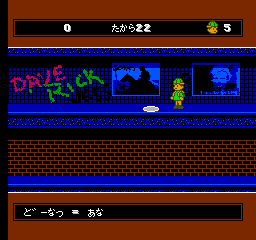
Fushigi na Blobby - Blobania no Kiki is a platformer game released for the Nintendo Entertainment System, specifically in Japan. The game features a quirky blob character navigating through various levels. While details about the developer are not widely documented, the title has gained some recognition among retro gaming enthusiasts for its unique art style and gameplay mechanics.
In the game, players control a blob-like character and navigate through a series of platforming challenges. The gameplay focuses on jumping, avoiding obstacles, and collecting items to progress through the levels. The mechanics are typical for platformers of its era, emphasizing precision and timing, which can be quite engaging for fans of the genre.
Although Fushigi na Blobby may not be as well-known as some of its contemporaries, it offers a nostalgic experience for players who appreciate classic platformers. Its simple yet charming aesthetic and straightforward gameplay make it a decent title to explore, especially for those interested in lesser-known NES games. While it might not have the depth of more prominent titles, it still holds a place in the extensive library of retro gaming.
GAME INFO
- Platform
- Nintendo Entertainment System
- Genre
- Platformer
- Players
- 1
- Region
- Japan
How to play Fushigi na Blobby - Blobania no Kiki online
To get started with Fushigi na Blobby, you'll first need to navigate the main menu, which is entirely in Japanese. This means familiarity with the language or some trial and error might be necessary to select options. Begin by choosing the start game option to jump into the action.
As you play, focus on mastering the jumping mechanics and timing your movements to avoid pitfalls and enemies. The core loop involves moving through levels, collecting items, and completing each stage. Learning the layout of each level and practicing your jumps will help you progress further into the game.
CONTROLS
Controls
- Arrow Keys — D-Pad / Movement
- X — A button (jump / confirm)
- S — B button (run / attack / cancel)
- Enter — Start / Pause
- V — Select
Fushigi na Blobby - Blobania no Kiki FAQ
Is Fushigi na Blobby - Blobania no Kiki considered easy to pick up or challenging?
It is generally considered to be on the easier side, making it accessible for new players. The simplicity of controls and level design allows for a smooth learning curve.
Does Fushigi na Blobby - Blobania no Kiki have a multiplayer or co-op mode?
The game is designed for single-player experience only, so there are no multiplayer or co-op options available. Players will need to navigate the challenges alone.
Who developed Fushigi na Blobby - Blobania no Kiki?
Information about the development team is not widely documented, so specifics about the developers remain unclear. The game is primarily recognized for its unique gameplay rather than its development background.
You may also like
All Nintendo Entertainment System games











GAME INFO
- Platform
- Nintendo Entertainment System
- Genre
- Platformer
- Players
- 1
- Region
- Japan
COMMENTS (0)
No comments yet. Be the first to share your thoughts.