The game loads when you press Play · press “Play Now” inside the game if it asks.
Fire Hawk (USA) (Unl)
Fire Hawk
Getting to Know Fire Hawk
- Nintendo Entertainment System
- Action
- Unlicensed
- 5· 0 votes
Fire Hawk (USA) (Unl) is an unlicensed title for the Nintendo Entertainment System. Released in the late 1980s, it is part of the action genre and was created by an unknown developer. As an unlicensed game, it stands apart from the titles officially sanctioned by Nintendo, which adds a layer of intrigue for collectors and retro gaming enthusiasts alike.
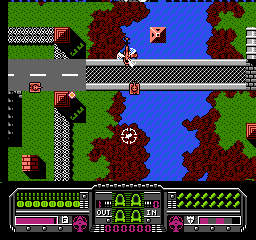
In Fire Hawk, players take on the role of a pilot navigating through various levels filled with enemies and obstacles. The gameplay typically involves shooting down foes while dodging projectiles, a common mechanic in many action games of the era. Players must also manage their resources and upgrade their abilities to progress through increasingly challenging stages, a hallmark of the genre that keeps gameplay engaging and dynamic.
What makes Fire Hawk worth playing today is its representation of the unlicensed titles that filled the NES library during its heyday. While it may not have the polish of official releases, it offers a nostalgic experience reminiscent of arcade-style shooters. Fans of retro games often appreciate these hidden gems for their unique gameplay and historical value, making Fire Hawk an interesting addition to any NES collection.
GAME INFO
- Platform
- Nintendo Entertainment System
- Genre
- Action
- Players
- 1
- Region
- USA
How to play Fire Hawk online
Getting started in Fire Hawk involves selecting your pilot and preparing for takeoff. Once in the game, players will navigate through side-scrolling levels, engaging in combat with various enemies. The core loop revolves around shooting, dodging, and upgrading your ship, which is essential for surviving tougher challenges as you progress.
As you play, focus on collecting power-ups and managing your health. Each level may have different enemy types and patterns, so learning their movements can be crucial for success. While the game may present a steep learning curve, mastering the controls and understanding enemy behaviors will enhance your experience and increase your chances of completing your mission.
CONTROLS
Controls
- Arrow Keys — D-Pad / Movement
- X — A button (jump / confirm)
- S — B button (run / attack / cancel)
- Enter — Start / Pause
- V — Select
Fire Hawk FAQ
Who developed Fire Hawk?
The developer of Fire Hawk is not widely documented, which is common for many unlicensed NES titles.
Is there anything iconic or memorable about Fire Hawk?
Fire Hawk is known for its unlicensed status and offers a nostalgic glimpse into the era of NES games that were not officially sanctioned by Nintendo.
Is Fire Hawk considered easy to pick up or challenging?
The game presents a challenging experience, especially for those unfamiliar with the mechanics of action games from that time. Players may need to invest time to master the controls and enemy patterns.
You may also like
All Nintendo Entertainment System games











GAME INFO
- Platform
- Nintendo Entertainment System
- Genre
- Action
- Players
- 1
- Region
- USA
COMMENTS (0)
No comments yet. Be the first to share your thoughts.