The game loads when you press Play · press “Play Now” inside the game if it asks.
Field Combat (Japan)
Field Combat
Field Combat on NES
- Nintendo Entertainment System
- Action
- 5· 0 votes
GAME INFO
- Platform
- Nintendo Entertainment System
- Genre
- Action
- Publisher
- Jaleco
- Developer
- Tose Co.
- Released
- 1985
- Players
- 1
- Region
- Japan
How to play Field Combat online
Getting Started
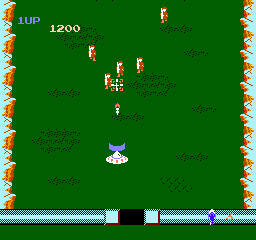
When you begin, your armored vehicle appears near the bottom of a vertically scrolling battlefield packed with aggressive enemy units. The immediate goal is to survive and push forward, using the D-Pad to weave between enemy tanks, missile attacks, and other obstacles. Shooting is handled with the B button, which fires your main weapon directly upward. There is no complex menu system to navigate, so even with Japanese on the title screen, you can jump right into the action.
A key mechanic is rescuing friendly soldiers who stand trapped on the field. Driving over them adds them to your side, and they will then fight alongside you, providing extra firepower. You can carry multiple allies at once, and they form a line trailing behind your vehicle. Losing a life happens when you collide with an enemy or get hit by enemy projectiles, so positioning is everything. The game does not pause, so you need to manage threats while scooping up as many comrades as possible.
The core loop revolves around balancing offense with preservation. Destroying enemies clears the path, but the allied soldiers you collect will also be lost if they take hits. Prioritizing which targets to destroy and when to dart for a rescue creates a satisfying risk versus reward rhythm. There is no map or stage indicator; the scroll keeps going, so your only benchmark is how far you can push before being overwhelmed.
CONTROLS
Controls
- Arrow Keys: D-Pad / Movement
- X: A button (jump / confirm)
- S: B button (run / attack / cancel)
- Enter: Start / Pause
- V: Select
Field Combat FAQ
Who developed Field Combat?
The developer of Field Combat is not widely documented, which leaves some uncertainty about its origins.
Does Field Combat have a multiplayer or co-op mode?
The game is primarily designed for single-player gameplay, without any multiplayer or co-op options available.
Is Field Combat considered easy to pick up or challenging?
The game has a moderate learning curve, making it accessible for newcomers while still providing challenges for experienced players.
You may also like
All Nintendo Entertainment System games











GAME INFO
- Platform
- Nintendo Entertainment System
- Genre
- Action
- Publisher
- Jaleco
- Developer
- Tose Co.
- Released
- 1985
- Players
- 1
- Region
- Japan
COMMENTS (0)
No comments yet. Be the first to share your thoughts.