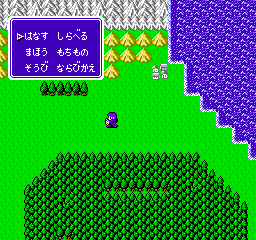
The game loads when you press Play · press “Play Now” inside the game if it asks.
Double Moon Densetsu (Japan)
Double Moon Densetsu
About Double Moon Densetsu
- Nintendo Entertainment System
- Action
- 5· 0 votes
Double Moon Densetsu is a Japanese title released for the Nintendo Entertainment System. It is known for its unique gameplay mechanics and stands as a representative of the action genre in the retro gaming landscape. The details about its developer and publisher are not widely documented, but it is primarily recognized as a classic game from the NES era.
In Double Moon Densetsu, players engage in a blend of action and exploration, typical of many NES titles. The gameplay involves navigating through various levels, overcoming obstacles, and defeating enemies. The mechanics are reminiscent of other action games of the time, focusing on player skill and timing to progress through the challenges presented in the game.
This title is worth exploring for those interested in lesser-known gems from the NES library. While it may not have the mainstream recognition of other titles, its unique gameplay offers a nostalgic experience for retro enthusiasts. Compared to similar games from the same era, it provides a different flavor that can be refreshing for players looking to expand their collection beyond the most popular franchises.
GAME INFO
- Platform
- Nintendo Entertainment System
- Genre
- Action
- Publisher
- Nippon Computer Systems
- Developer
- Nippon Computer Systems
- Released
- 1992
- Region
- Japan
How to play Double Moon Densetsu online
Getting started with Double Moon Densetsu involves selecting your game mode from the main menu, which is unfortunately presented in Japanese. Familiarize yourself with the controls to navigate the levels effectively. Players typically start by moving through the first level and learning how to interact with the environment and enemies.
As you progress, the core loop revolves around defeating enemies and collecting items to enhance your abilities. Understanding the mechanics of jumping and attacking is crucial, as timing can make a significant difference in overcoming obstacles. Although the menus are in Japanese, the gameplay itself is intuitive enough for players to grasp the objectives quickly.
CONTROLS
Controls
- Arrow Keys — D-Pad / Movement
- X — A button (jump / confirm)
- S — B button (run / attack / cancel)
- Enter — Start / Pause
- V — Select
Double Moon Densetsu FAQ
Who developed Double Moon Densetsu?
The developer of Double Moon Densetsu is not widely documented, leaving some ambiguity around its origins.
Roughly how long does it take to finish Double Moon Densetsu?
Completion time for Double Moon Densetsu can vary, but typical playthroughs may take a few hours depending on player skill and familiarity with the genre.
Is Double Moon Densetsu an official release, a fan hack, a prototype, or another kind of build?
This game is classified as an official release, specifically for the Japanese market, and is recognized within the NES library.
You may also like
All Nintendo Entertainment System games











GAME INFO
- Platform
- Nintendo Entertainment System
- Genre
- Action
- Publisher
- Nippon Computer Systems
- Developer
- Nippon Computer Systems
- Released
- 1992
- Region
- Japan
COMMENTS (0)
No comments yet. Be the first to share your thoughts.