The game loads when you press Play · press “Play Now” inside the game if it asks.
Cool World (USA)
Cool World
Getting to Know Cool World
- Nintendo Entertainment System
- Platformer
- 5· 0 votes
Cool World (USA) is a platforming video game released for the Nintendo Entertainment System. Based on the animated film of the same name, it was developed during the early 1990s, a time when many games were being adapted from popular media. While the game has its roots in a beloved movie, it remains a lesser-known title in the NES library, which is filled with iconic classics.
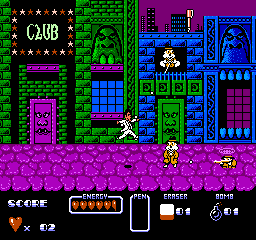
In Cool World, players take on the role of a character navigating through a whimsical world that blends animated visuals with platforming challenges. The gameplay involves jumping and running across various levels, overcoming obstacles, and defeating enemies. Each stage presents unique challenges, and the player must utilize their skills to progress through the game while collecting items and power-ups along the way.
This title is worth exploring for those interested in retro games and animated adaptations from the era. While it may not hold the same nostalgic weight as other platformers of its time, it provides a unique glimpse into the crossover of film and gaming. Fans of platformers or those curious about lesser-known NES titles might find something enjoyable in its quirky design and gameplay mechanics.
GAME INFO
- Platform
- Nintendo Entertainment System
- Genre
- Platformer
- Publisher
- Ocean Software
- Developer
- Twilight
- Released
- 1992
- Players
- 1
- Region
- USA
How to play Cool World online
Getting started in Cool World involves selecting your character and beginning your adventure through the colorful levels. The core gameplay loop consists of navigating through stages, jumping over hazards, and defeating enemies to progress. As you explore, keep an eye out for power-ups that enhance your abilities, making it easier to tackle tougher challenges.
As you advance, you'll encounter various obstacles and enemies that require precise timing and skill to overcome. Familiarizing yourself with the controls and level layouts is key to success. Remember to collect items as you go, as they can aid you in your journey through the vibrant and animated world of Cool World.
CONTROLS
Controls
- Arrow Keys — D-Pad / Movement
- X — A button (jump / confirm)
- S — B button (run / attack / cancel)
- Enter — Start / Pause
- V — Select
Cool World FAQ
What type of game is Cool World?
This is a platforming game that combines elements of action with whimsical visuals inspired by the animated film. Players navigate through various levels while overcoming obstacles and enemies.
Does Cool World have a multiplayer or co-op mode?
There is no multiplayer or co-op mode in Cool World. This game is designed for a single-player experience.
Who developed Cool World?
The developer of Cool World is not widely documented. However, it was released for the NES as part of a trend of video games based on popular films during that era.
You may also like
All Nintendo Entertainment System games











GAME INFO
- Platform
- Nintendo Entertainment System
- Genre
- Platformer
- Publisher
- Ocean Software
- Developer
- Twilight
- Released
- 1992
- Players
- 1
- Region
- USA
COMMENTS (0)
No comments yet. Be the first to share your thoughts.