The game loads when you press Play · press “Play Now” inside the game if it asks.
Circus Charlie (Japan)
Circus Charlie
About Circus Charlie
- Nintendo Entertainment System
- Action
- 5· 0 votes
Circus Charlie is a game released exclusively in Japan for the Nintendo Entertainment System. Developed during the late 1980s, it falls into the action genre, typical of the era's arcade-style gameplay. This title is notable for being a unique offering on the NES, showcasing the creativity of Japanese developers in a burgeoning gaming market.
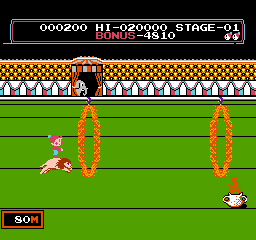
In Circus Charlie, players take on the role of a circus performer navigating various obstacles and challenges. The gameplay focuses on timing and precision as players jump and maneuver through rings and other circus-themed elements. The mechanics are straightforward, emphasizing quick reflexes and the ability to react to the game's fast-paced environment, which is a hallmark of many arcade games from this period.
While Circus Charlie may not be as widely recognized as other NES titles, it holds a certain charm and nostalgia for those who enjoy classic gaming. Its simple yet engaging mechanics provide a fun experience, especially for fans of the action genre. Compared to contemporaries, it offers a different flavor of gameplay that can be refreshing for players looking to explore lesser-known gems of the NES library.
GAME INFO
- Platform
- Nintendo Entertainment System
- Genre
- Action
- Publisher
- Konami
- Developer
- Konami
- Released
- 1984
- Players
- 1
- Region
- Japan
How to play Circus Charlie online
Getting started with Circus Charlie involves understanding its basic mechanics and controls. When you first launch the game, you will be greeted with the title screen, where you can start your circus act. As a player, your main objective is to navigate through various challenges, jumping through rings and avoiding obstacles.
The core loop involves timing your jumps and movements accurately to maintain momentum and score points. Be aware that the menus are in Japanese, which may require some navigation hints. Familiarizing yourself with the controls will help you get the hang of the gameplay mechanics quickly, allowing you to enjoy the unique circus-themed challenges that Circus Charlie presents.
CONTROLS
Controls
- Arrow Keys — D-Pad / Movement
- X — A button (jump / confirm)
- S — B button (run / attack / cancel)
- Enter — Start / Pause
- V — Select
Circus Charlie FAQ
Does Circus Charlie have a multiplayer or co-op mode?
There is no known multiplayer or co-op mode in Circus Charlie. The game is designed for single-player experience, focusing on individual skill and timing.
Which regions was Circus Charlie released in?
Circus Charlie was released exclusively in Japan. It did not have an official release in other regions, making it a niche title for collectors.
Is there anything iconic or memorable about Circus Charlie?
The game is memorable for its circus theme and simple yet engaging gameplay. Its unique challenges and arcade-style mechanics create a nostalgic experience for fans of retro gaming.
You may also like
All Nintendo Entertainment System games











GAME INFO
- Platform
- Nintendo Entertainment System
- Genre
- Action
- Publisher
- Konami
- Developer
- Konami
- Released
- 1984
- Players
- 1
- Region
- Japan
COMMENTS (0)
No comments yet. Be the first to share your thoughts.