The game loads when you press Play · press “Play Now” inside the game if it asks.
Ys DS (Japan)
Ys DS
Ys DS on NDS
- Nintendo DS
- RPG
- 5· 0 votes
Ys DS (Japan) is a role-playing game developed for the Nintendo DS, released exclusively in Japan. It is part of the long-running Ys series, which is known for its action RPG elements and engaging narratives. The title was developed by Nihon Falcom, a studio with a rich history in creating classic RPGs, particularly in the 1980s and 1990s.
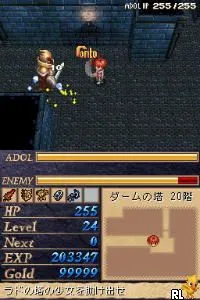
In Ys DS, players take on the role of Adol Christin, the series' protagonist, as they explore dungeons, battle enemies, and unravel the story. The game retains the real-time action combat mechanics that the series is known for, allowing players to attack and dodge in real-time rather than using turn-based strategies. The gameplay is structured around completing quests and leveling up, with an emphasis on exploration and character interaction, which is a hallmark of the RPG genre.
Today, Ys DS is worth trying for fans of the action RPG genre, particularly those interested in the history of Japanese gaming. While it may not have the same recognition as some other titles in the Ys series, it offers a nostalgic experience that showcases the evolution of RPG mechanics on handheld systems. It stands as a testament to the enduring appeal of the Ys franchise and is a solid entry for both newcomers and veterans of the genre.
GAME INFO
- Platform
- Nintendo DS
- Genre
- RPG
- Publisher
- Interchannel
- Released
- 2008
- Players
- 1
- Region
- Japan
How to play Ys DS online
To get started with Ys DS, select your save file from the main menu, which is in Japanese. As you begin, familiarize yourself with the controls and the layout of the world. Explore towns and speak with NPCs to gather quests and information. Combat is real-time, so practice attacking and dodging as you encounter enemies.
The core loop involves completing quests, defeating monsters, and leveling up your character. Pay attention to your health and items, as they are crucial for survival in tougher battles. As this is a Japanese-only title, navigating menus can be challenging, but basic icons and familiar RPG conventions can help you progress through the game.
CONTROLS
Controls
- Arrow Keys — D-Pad / Movement
- X — A button
- S — B button
- Z — Y button
- A — X button
- Q — L shoulder
- E — R shoulder
- Enter — Start
- V — Select
Ys DS FAQ
Is Ys DS considered easy to pick up or challenging?
The game is generally considered accessible for newcomers to the Ys series but may still present challenges in its combat mechanics and dungeon exploration.
Is there anything iconic or memorable about Ys DS?
Ys DS is notable for its engaging action combat and the return of Adol Christin, a beloved character in the series. Its graphics and music also reflect the charm of the early 2000s RPGs.
Who developed Ys DS?
Nihon Falcom is the developer behind Ys DS, continuing its legacy of creating captivating RPGs since the series began in the 1980s.
You may also like
All Nintendo DS games











GAME INFO
- Platform
- Nintendo DS
- Genre
- RPG
- Publisher
- Interchannel
- Released
- 2008
- Players
- 1
- Region
- Japan
COMMENTS (0)
No comments yet. Be the first to share your thoughts.