CHOOSE A VERSION
2 versions · same consoleChoose an original release, regional version, revision, bootleg or clearly labelled ROM hack/mod, then press Play. Hacks may change the gameplay. Switching versions restarts the player.
Selected: Default · Europe · En,Fr,De,Es,It · Europe
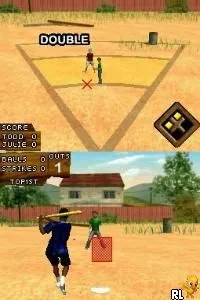
The game loads when you press Play · press “Play Now” inside the game if it asks.
Wiffle Ball (Europe) (En,Fr,De,Es,It)
Wiffle Ball
Wiffle Ball Overview
- Nintendo DS
- Sports
- 5· 0 votes
GAME INFO
- Platform
- Nintendo DS
- Genre
- Sports
- Released
- 2009
- Region
- Europe
How to play Wiffle Ball online
To get started with Wiffle Ball, select a game mode from the main menu. Depending on your choice, you can play a quick match, engage in practice sessions, or challenge friends in multiplayer mode. Familiarize yourself with the controls, as timing your swings and pitches is crucial for success.
The core loop revolves around batting, pitching, and running the bases. As you play, focus on improving your timing and understanding the game's mechanics, like how to effectively pitch to opponents or hit the ball. Keep an eye out for power-ups or special moves that may enhance your gameplay experience, making it more engaging and enjoyable.
CONTROLS
Controls
- Arrow Keys — D-Pad / Movement
- X — A button
- S — B button
- Z — Y button
- A — X button
- Q — L shoulder
- E — R shoulder
- Enter — Start
- V — Select
Wiffle Ball FAQ
Who developed Wiffle Ball?
Information about the developer is not widely documented.
Can players save progress in Wiffle Ball?
The game does not feature a save function, so players will need to complete matches in one sitting.
In what year was Wiffle Ball originally released?
The original release year is not widely documented.
You may also like
All Nintendo DS games
GAME INFO
- Platform
- Nintendo DS
- Genre
- Sports
- Released
- 2009
- Region
- Europe
COMMENTS (0)
No comments yet. Be the first to share your thoughts.