CHOOSE A VERSION
2 versions · same consoleChoose an original release, regional version, revision, bootleg or clearly labelled ROM hack/mod, then press Play. Hacks may change the gameplay. Switching versions restarts the player.
Selected: Default · USA · En,Fr,Es · USA
The game loads when you press Play · press “Play Now” inside the game if it asks.
Touch Mechanic (USA) (En,Fr,Es)
Touch Mechanic
What is Touch Mechanic?
- Nintendo DS
- Puzzle
- 5· 0 votes
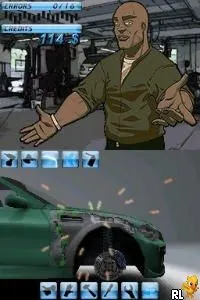
Touch Mechanic (USA) (En,Fr,Es) is a unique title for the Nintendo DS that blends elements of puzzle and simulation genres. Released during the height of the DS's popularity, this game allows players to engage with various mechanical challenges using the touchscreen capabilities of the console. Although details about the developer and publisher remain elusive, the game's design reflects the era's trend toward innovative use of handheld technology.
In Touch Mechanic, players find themselves solving a variety of mechanical puzzles. The game utilizes the DS's touchscreen to simulate tasks such as repairing machinery or assembling components. Players must demonstrate precision and problem-solving skills to progress through levels, making it essential to understand the mechanics of each challenge. The interactive nature of the touch controls adds a layer of engagement, setting it apart from traditional puzzle games of the time.
For those interested in retro gaming, Touch Mechanic offers a nostalgic glimpse into the experimental phase of the DS library. While it may not have achieved the same recognition as blockbuster titles, its focus on touchscreen mechanics makes it a noteworthy experience. Fans of puzzle-solving games or those curious about the DS's capabilities might find value in exploring this lesser-known gem, as it embodies the innovative spirit of its platform era.
GAME INFO
- Platform
- Nintendo DS
- Genre
- Puzzle
- Released
- 2008
- Region
- USA
How to play Touch Mechanic online
Getting Started: To begin playing Touch Mechanic, start by selecting your game mode from the main menu. The game is structured around various mechanical puzzles that require you to use the touchscreen for interaction. Familiarize yourself with the controls, as precision is key to successfully completing each challenge.
As you dive into the puzzles, you'll encounter a series of tasks that involve assembling and repairing machines. Each level presents unique challenges that often require a combination of quick thinking and dexterity. Pay close attention to the on-screen prompts and hints, as they will guide you through the mechanics of each puzzle. Mastering the touch controls will enhance your gameplay experience significantly, so practice is beneficial as you progress through the game.
CONTROLS
Controls
- Arrow Keys — D-Pad / Movement
- X — A button
- S — B button
- Z — Y button
- A — X button
- Q — L shoulder
- E — R shoulder
- Enter — Start
- V — Select
Touch Mechanic FAQ
Who developed Touch Mechanic?
Information about the developer of Touch Mechanic is not widely documented.
Which regions was Touch Mechanic released in?
Touch Mechanic was released in the USA, with additional language options including French and Spanish.
Is Touch Mechanic exclusive to Nintendo DS or did it appear on other systems?
This title appears to be exclusive to the Nintendo DS platform, with no known releases on other systems.
You may also like
All Nintendo DS games











GAME INFO
- Platform
- Nintendo DS
- Genre
- Puzzle
- Released
- 2008
- Region
- USA
COMMENTS (0)
No comments yet. Be the first to share your thoughts.