The game loads when you press Play · press “Play Now” inside the game if it asks.
Tecmo Bowl - Kickoff (USA)
Tecmo Bowl - Kickoff
Tecmo Bowl - Kickoff - Sports Classic
- Nintendo DS
- Sports
- 5· 0 votes
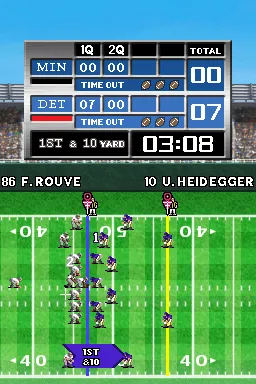
Tecmo Bowl - Kickoff (USA) is a sports video game for the Nintendo DS, released in the mid-2000s. Developed by Tecmo, it serves as a reboot of the classic Tecmo Bowl franchise that originally made waves in the late 1980s and early 1990s. The game stays true to its roots, offering an arcade-style football experience that appeals to both nostalgic fans and new players alike.
In Tecmo Bowl - Kickoff, players engage in fast-paced football matches, controlling teams through various plays and strategies. The gameplay is designed around quick matches, allowing players to jump right into the action. Each team features a roster of players with distinct abilities, and users can execute a variety of offensive and defensive strategies to outmaneuver their opponents. The controls are straightforward, making it accessible for newcomers while still offering depth for seasoned players.
This title is worth a look today for fans of retro sports games and those interested in the evolution of football video games. While it may not have the depth of modern titles, its charm lies in its simplicity and nostalgic feel. Compared to other sports games on the DS, Tecmo Bowl - Kickoff holds a unique position, appealing to players who appreciate classic gameplay mechanics and straightforward sports action.
GAME INFO
- Platform
- Nintendo DS
- Genre
- Sports
- Released
- 2007
- Players
- 1-2
- Region
- USA
How to play Tecmo Bowl - Kickoff online
Getting started with Tecmo Bowl - Kickoff is simple. First, choose your team and set up a match against the AI or a friend. The game allows for quick play sessions, making it easy to jump in and out whenever you want to enjoy a game of football.
During gameplay, you'll control your players to execute plays, tackle opponents, and score touchdowns. The core loop involves selecting plays, snapping the ball, and maneuvering your team to outsmart the opposing defense. Familiarizing yourself with the controls will help you master the game and make the most of your team's strengths.
CONTROLS
Controls
- Arrow Keys — D-Pad / Movement
- X — A button
- S — B button
- Z — Y button
- A — X button
- Q — L shoulder
- E — R shoulder
- Enter — Start
- V — Select
Tecmo Bowl - Kickoff FAQ
Is Tecmo Bowl - Kickoff exclusive to Nintendo DS or did it appear on other systems?
The game was released solely for the Nintendo DS, making it exclusive to that platform.
Does Tecmo Bowl - Kickoff have a multiplayer or co-op mode?
There is a multiplayer mode available, allowing players to compete against each other, which adds to the game's replayability.
What makes Tecmo Bowl - Kickoff stand out among Nintendo DS titles of its era?
Its arcade-style gameplay and nostalgic homage to the original Tecmo Bowl series set it apart, appealing to both retro gaming fans and newcomers alike.
You may also like
All Nintendo DS games











GAME INFO
- Platform
- Nintendo DS
- Genre
- Sports
- Released
- 2007
- Players
- 1-2
- Region
- USA
COMMENTS (0)
No comments yet. Be the first to share your thoughts.