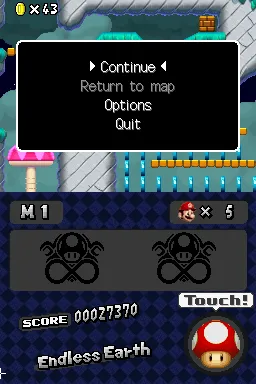
The game loads when you press Play · press “Play Now” inside the game if it asks.
Super Mario: Endless Earth
Super Mario: Endless Earth
Super Mario: Endless Earth on NDS
- Nintendo DS
- Platformer
- ROM Hack
- 5· 0 votes
Unofficial ROM hack. The notes below come from community sources and have not been verified against the patch itself, so levels, mechanics and features may differ from what is described.
Super Mario: Endless Earth is a fan-made game for the Nintendo DS that falls into the platformer genre. This title is not an official release but rather a rom hack, showcasing the creativity of the retro gaming community. The project draws inspiration from the classic Super Mario series, aiming to deliver a nostalgic experience for fans of the franchise.
In this game, players navigate through various levels, controlling Mario as he jumps, runs, and collects power-ups. The gameplay mechanics are reminiscent of traditional platformers, where timing and precision are key to overcoming obstacles and defeating enemies. As with many titles in the genre, the goal is to reach the end of each level while gathering coins and other collectibles along the way.
What makes Super Mario: Endless Earth worth exploring today is its homage to the classic Mario gameplay that many grew up with. While it may not have the polish of a commercial release, it captures the essence of what made the series enjoyable. For fans of retro platformers and those interested in the creativity of the gaming community, this title offers a unique experience that reflects the charm of its inspirations.
GAME INFO
- Platform
- Nintendo DS
- Genre
- Platformer
How to play Super Mario: Endless Earth online
To get started with Super Mario: Endless Earth, boot up the game and choose your desired mode. The game typically begins with an introductory level that familiarizes you with the controls and mechanics. As you progress, focus on jumping over obstacles, defeating enemies, and collecting items to enhance your abilities and score.
The core loop of the game revolves around completing levels while facing a variety of challenges. Pay attention to your surroundings, as some levels may have hidden areas or power-ups that can aid your progress. If you're new to platformers, take your time to practice your jumps and movements, as precision is crucial in navigating the game's levels effectively.
CONTROLS
Controls
- Arrow Keys — D-Pad / Movement
- X — A button
- S — B button
- Z — Y button
- A — X button
- Q — L shoulder
- E — R shoulder
- Enter — Start
- V — Select
Super Mario: Endless Earth FAQ
Who developed Super Mario: Endless Earth?
The information about the developer of Super Mario: Endless Earth is not widely documented.
What type of game is Super Mario: Endless Earth?
This title is classified as a platformer, similar to other games in the Super Mario series, featuring classic jumping and running mechanics.
Is Super Mario: Endless Earth exclusive to Nintendo DS or did it appear on other systems?
Super Mario: Endless Earth is a fan-made rom hack for the Nintendo DS and does not appear on other systems.
You may also like
All Nintendo DS games











GAME INFO
- Platform
- Nintendo DS
- Genre
- Platformer
COMMENTS (0)
No comments yet. Be the first to share your thoughts.