CHOOSE A VERSION
3 versions · same consoleChoose an original release, regional version, revision, bootleg or clearly labelled ROM hack/mod, then press Play. Hacks may change the gameplay. Switching versions restarts the player.
Selected: Default · USA · USA
The game loads when you press Play · press “Play Now” inside the game if it asks.
Sudoku Gridmaster (USA)
Sudoku Gridmaster
What is Sudoku Gridmaster?
- Nintendo DS
- Puzzle
- 5· 0 votes
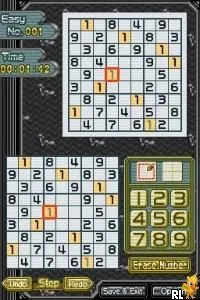
Sudoku Gridmaster (USA) is a puzzle game released for the Nintendo DS. It was developed by a lesser-known team and published by 505 Games, making its mark in the puzzle genre during the mid-2000s. This title is part of the trend of handheld gaming that popularized Sudoku, especially in the wake of the puzzle's global surge in popularity.
In Sudoku Gridmaster, players tackle a variety of Sudoku puzzles that range in difficulty. The gameplay revolves around filling a 9x9 grid with numbers 1 through 9, ensuring that each number appears only once in each row, column, and 3x3 sub-grid. Players can select from different difficulty levels, which adds a layer of challenge and replayability, as they strive to improve their skills and solve puzzles more efficiently.
This title holds a niche appeal for fans of Sudoku and puzzle games on the DS platform. While it may not have the same widespread recognition as other major titles, it offers a solid and enjoyable experience for anyone looking to engage in logical problem-solving. The game remains a testament to the enduring popularity of Sudoku, providing a portable way to enjoy the classic number puzzle in a convenient format.
GAME INFO
- Platform
- Nintendo DS
- Genre
- Puzzle
- Publisher
- Nintendo
- Developer
- Hudson Soft
- Released
- 2006
- Players
- 1
- Region
- USA
How to play Sudoku Gridmaster online
Getting started in Sudoku Gridmaster involves selecting a puzzle from the main menu, where you can choose from various difficulty levels. Once you enter a puzzle, use the stylus or directional controls to navigate the grid and input numbers. The core loop consists of filling in the grid while adhering to Sudoku rules, which can be challenging but rewarding as you progress.
As you play, pay attention to the numbers already placed in the grid, as they will guide your decisions on where to fill in blanks. You can also take advantage of any hints the game may offer if you get stuck. Familiarizing yourself with the controls and the grid layout will help you complete puzzles more efficiently, making for a satisfying puzzle-solving experience.
CONTROLS
Controls
- Arrow Keys — D-Pad / Movement
- X — A button
- S — B button
- Z — Y button
- A — X button
- Q — L shoulder
- E — R shoulder
- Enter — Start
- V — Select
Sudoku Gridmaster FAQ
Who developed Sudoku Gridmaster?
The developer of Sudoku Gridmaster is not widely documented, but it was published by 505 Games.
Is Sudoku Gridmaster considered easy to pick up or challenging?
The game is generally considered accessible for beginners, but it offers varying levels of difficulty that can challenge even experienced players.
Is Sudoku Gridmaster exclusive to Nintendo DS or did it appear on other systems?
Sudoku Gridmaster is primarily known as a Nintendo DS title and does not have widespread releases on other systems.
You may also like
All Nintendo DS games











GAME INFO
- Platform
- Nintendo DS
- Genre
- Puzzle
- Publisher
- Nintendo
- Developer
- Hudson Soft
- Released
- 2006
- Players
- 1
- Region
- USA
COMMENTS (0)
No comments yet. Be the first to share your thoughts.